Last Updated: 2026
Quick Answer: Your Telegram phone number is the private ID tied to your SIM card and required for account setup, while your username is an optional, public @handle you can share instead. A username lets people find and message you at t.me/username without ever seeing your number, and you can change or remove it anytime. Your phone number stays fixed unless you formally change it in Settings.
Key Facts
- Every Telegram account needs a phone number to register — there’s no way around this step.
- A username is optional and must be at least 5 characters long.
- Usernames can contain letters, numbers, and underscores — no spaces or symbols.
- Your username is unique across all of Telegram; your display name is not.
- You can change your username as often as you like, as long as the new one is free.
- Setting a username lets you hide your phone number from everyone except saved contacts.
- If you delete your Telegram account, your old username becomes available for someone else to claim.
What’s the Real Difference Between a Telegram Username and a Phone Number?
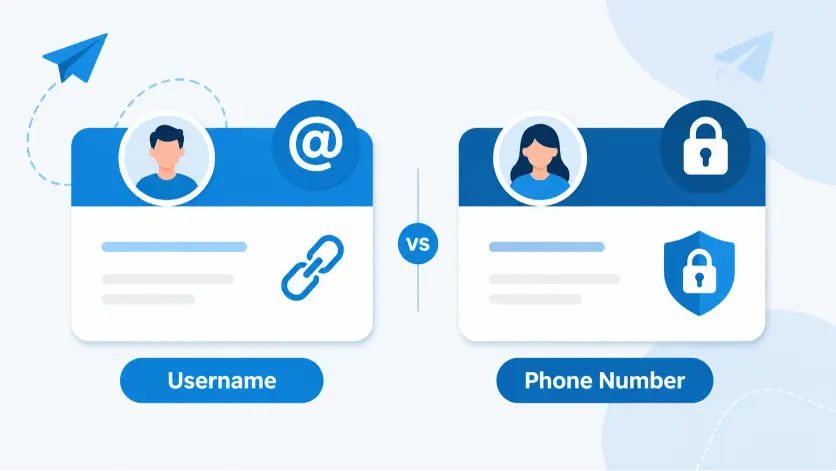
A phone number is your account’s foundation. A username is your account’s public face.
Telegram ties every account to a phone number during signup, the same way most apps require an email address. That number verifies who you are and lets Telegram send you login codes. It stays private by default and only shows to people who already have it saved in their phone.
A username works differently. It’s a handle — something like @sarahtravels — that anyone can search for, tap, or click as a link. You don’t need it to use Telegram, but adding one changes how people find and reach you.
Think of your phone number as your ID card and your username as your business card. One proves who you are behind the scenes. The other is what you actually hand out.
How Does a Telegram Username Work?
Your username becomes your public identity on the platform.
Once you set one, anyone can find you by searching @yourusername in Telegram’s search bar, even without your phone number saved. They can also message you directly through a link: t.me/yourusername. That link works in browsers, on other social platforms, or in an email signature.
A few rules apply:
- Usernames must be at least 5 characters.
- They can only use letters, numbers, and underscores — no spaces, hyphens, or emoji.
- Each username is unique. If someone else already claimed “@johnsmith,” you’ll need a variation.
- You can change it whenever you want through Settings, as long as your new choice isn’t taken.
- Groups, channels, and bots can also have their own separate usernames.
Changing your username doesn’t create a new account. Your chat history, contacts, and settings all stay exactly where they were.
How Does Your Phone Number Work on Telegram?
Your phone number is the anchor Telegram uses to identify your account and verify it’s really you.
You enter it once during signup, confirm it with an SMS or call, and Telegram links it to your account permanently — unless you change it manually. From that point on, your number does two jobs:
- It lets people who already have it saved in their contacts find you on Telegram automatically.
- It’s the number Telegram uses to send security codes if you ever log in on a new device.
By default, your phone number stays hidden from strangers. Only people who saved it in their phone contacts, or who share a group with you, may be able to see or use it, depending on your privacy settings.
How Do You Set or Change a Telegram Username?
Setting one takes less than a minute.
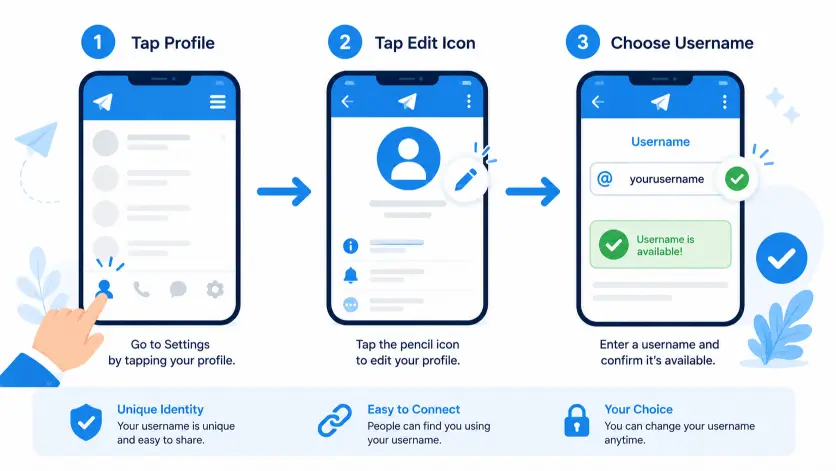
- Open Settings and tap your profile at the top.
- Tap Edit (or the pencil icon).
- Select Username.
- Type your desired handle. Telegram checks availability instantly.
- Tap Save once you see the green checkmark confirming it’s free.
If your first choice is taken, try adding numbers, an underscore, or a short prefix related to your name or brand. Avoid anything tied to your birth year or home address — usernames are public.
Telegram Username vs Phone Number: Full Comparison
| Feature | Username | Phone Number |
|---|---|---|
| Required to sign up | No | Yes |
| Visible to strangers by default | Yes, if set | No |
| Can be changed | Yes, anytime | Yes, with a separate process |
| Unique across Telegram | Yes | Yes |
| Used for login verification | No | Yes |
| Lets others message you without saving contact | Yes | No |
| Reused after account deletion | Yes, becomes available | No, tied to the carrier |
| Best for | Public profiles, business, dating apps, communities | Trusted friends and family |
Can You Use Telegram Without a Username?
Yes. A username is completely optional.
Without one, people can still message you if they have your phone number saved as a contact, or if you message them first. You just won’t be searchable by handle, and you can’t share a t.me link that points straight to your profile.
Skipping a username works fine for people who only chat with close contacts. It becomes limiting fast if you want strangers, customers, or online communities to reach you.
Can You Use Telegram Without Sharing Your Phone Number?
Not during signup — Telegram always requires a number to create the account. After that, though, you can hide it from almost everyone.
Go to Settings > Privacy and Security > Phone Number and set visibility to “Nobody.” Combine that with a username, and people can message you without ever learning your real number. This is the exact setup privacy-focused users rely on for public groups, dating profiles, or business accounts.
When Should You Use a Username Instead of Your Phone Number?
Use a username any time you’re sharing your contact info somewhere public or semi-public. That includes:
- Business or freelance work, where clients need a way to reach you professionally.
- Public groups or channels you run, so members can DM you without your number leaking.
- Dating apps or online communities, where handing out your real number feels premature.
- Social media bios, where a t.me link is easier to share than a phone number.
Stick with your phone number for close friends and family who already have it saved. It’s more familiar, and Telegram automatically finds those contacts for you.
What Happens If You Don’t Set a Username?
Nothing breaks — Telegram works fully without one. But a few things change:
- People can only add you by phone number, not by searching a handle.
- You can’t generate a personal t.me link to share.
- Public groups and channels you create will use a numeric ID link instead of a clean, memorable one.
For casual, contacts-only use, skipping a username is fine. For anyone building a public presence, it’s worth setting one up.
Common Mistakes People Make With Usernames and Phone Numbers
Assuming a username hides your number automatically. It doesn’t. You still need to set your phone number visibility to “Nobody” or “My Contacts” in Privacy settings.
Picking a username tied to personal details. Usernames like @sarah_johnson_1990 give away information you might not want public. Go generic or brand-specific instead.
Forgetting that old usernames get recycled. If you delete your account or drop a username, someone else can claim it. Don’t leave it as your only point of contact for anything important.
Not checking group visibility settings. Being in shared groups can expose your phone number to other members, even with strict privacy settings, depending on how the group is configured.
Telegram Username vs Phone Number: Frequently Asked Questions
Can someone find my phone number if I only give them my username?
No, not directly. Sharing your username doesn’t reveal your phone number unless you’ve separately set your number’s visibility to “Everyone” in Privacy settings.
Do I need a username to create a Telegram channel or group?
You don’t need a personal username, but public channels and supergroups need their own username if you want a shareable t.me link. Private groups work fine without one.
Can two people have the same Telegram username?
No. Usernames are unique across the entire platform. If your first choice is taken, Telegram will prompt you to pick another.
What happens to my username if I delete my Telegram account?
It becomes available for anyone else to register once your account deletion is complete. Don’t count on getting it back if you create a new account later.
Can I change my phone number without losing my Telegram data?
Yes. Go to Settings > Edit Profile > Phone Number, verify the new number, and your chats, contacts, and settings all carry over.
Is it safer to give someone my Telegram username or phone number?
A username is generally safer for people you don’t know well, since it doesn’t expose your real number. Save phone number sharing for contacts you already trust.
Why can’t people find me by username even though I set one?
Double-check that your username saved correctly in Settings, and confirm the person is searching the exact spelling, including any underscores. Recently changed usernames can also take a few minutes to update in search.
If you’re setting your number to “Nobody,” pair it with our guide on how to hide your phone number on Telegram for the full step-by-step walkthrough. For broader control over who sees your activity, check our Telegram privacy settings guide.
DeleteAccountGuide.com is not affiliated with Telegram. This guide is for informational purposes only. Steps may vary slightly depending on your app version.

Alex Mu is a digital technology writer focused on Telegram, account management, online privacy, and app troubleshooting. Through clear, practical guides, Alex helps readers understand digital platforms, manage their accounts, and resolve common technical issues. His work emphasizes accurate information, simple explanations, and step-by-step solutions that readers can follow with confidence.


