
Last Updated: August 2026
Quick Answer: No. Telegram’s built-in AI features — AI summaries, the AI text editor, and AI sticker search — run entirely on Cocoon, Telegram’s own encrypted compute network. They never send your messages to Telegram’s servers, to third-party AI companies, or to the people running the network’s GPUs in a readable form. One big exception exists: third-party AI bots work differently, and those can read whatever you send them.
Key Facts
- Cocoon is Telegram’s own decentralized, encrypted AI compute network, built on the TON blockchain
- It currently powers three native features: AI channel/Instant View summaries, the AI text editor, and AI-powered sticker search
- Telegram states plainly that these features never send data to third parties
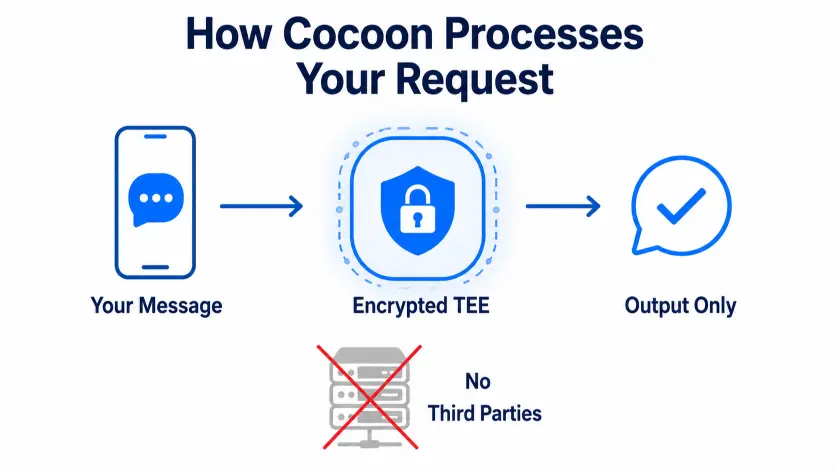
- Your input runs inside a Trusted Execution Environment (TEE) — even the people running the GPU hardware can’t see it
- Cocoon does not power regular chats, group chats, or any AI chatbot you didn’t add yourself
- Third-party bots and mini apps fall into a completely different privacy category — Telegram doesn’t control what they do with your messages
What Is Cocoon, Exactly?
Cocoon is the infrastructure Telegram built to run its own AI features. It avoids handing user data to companies like Amazon, Microsoft, or OpenAI. Instead of routing requests through one centralized cloud provider, Cocoon spreads the work across independent GPU operators around the world. The TON blockchain coordinates the network and pays those operators.
The privacy piece relies on a technology called a Trusted Execution Environment, specifically Intel TDX. Your request enters an isolated, encrypted enclave on that GPU hardware. The operator running the machine can’t see what’s inside — not your text, not the model’s output, nothing. Telegram calls this “confidential compute,” and that’s the technical claim behind the term.
Telegram’s own FAQ describes it directly: Cocoon is a secure, open-source and decentralized AI platform that allows privacy-conscious applications like Telegram to utilize the latest AI models, and Telegram developed and uses it to power its AI features without relying on third parties, keeping data protected and inaccessible. Telegram
So, Does Telegram’s AI Actually Read Your Messages?
Here’s the direct answer, straight from Telegram’s own support documentation: Telegram’s AI features — including translation, custom tones, AI summaries of long channel posts and Instant View articles, and AI-powered sticker search — run on Cocoon and never send any data to third parties, with processing happening in a highly secure, isolated and encrypted environment where the data stays inaccessible. Telegram
Here’s what that means in plain terms. When the AI editor rewrites your message in a “Formal” tone, an AI model briefly processes that text to produce the output. When Telegram auto-summarizes a long channel post, the same thing happens. That step is unavoidable — it’s how any AI feature works. Cocoon changes where and how that processing happens. No company server logs it. No one stores it for training. The hardware operator running the computation never sees it either.
Most AI assistants work differently today. Your prompt usually travels to one company’s centralized servers. That company may retain it, review it, or use it to improve their models.
What Cocoon Does Not Do
A lot of the confusion starts here, so it’s worth being precise:
- Cocoon doesn’t scan your regular chats. It doesn’t sit in the background reading your conversations. It only activates when you deliberately use an AI feature — tapping “Summarize,” using the AI text editor, or searching for a sticker with AI.
- Cocoon isn’t a chatbot. No general-purpose “Telegram AI” exists for you to just talk to. You have to add a bot yourself for that.
- Cocoon doesn’t touch Secret Chats. Secret Chats use end-to-end encryption between devices. No Telegram feature can access them, AI included.
The Feature That Actually Puts Your Privacy at Risk: Third-Party Bots
Most articles about Cocoon skip this part. It’s the most important distinction for anyone asking this question.
Cocoon covers Telegram’s own AI features only. It says nothing about the thousands of third-party AI bots and mini apps available inside Telegram — ChatGPT wrappers, “AI assistant” bots, summarizer bots, and more. Outside developers build and operate those. They follow their own privacy policies, not Telegram’s.
Send a message to a third-party bot, and that bot’s operator can read it, store it, and route it through whatever AI provider they choose. Some of those providers offer no encryption guarantees at all. Telegram’s FAQ spells this out clearly: if you use AI through a third-party bot or mini app, you are using a third-party service, not Telegram, and should check that bot’s privacy policy for details. Telegram
So the honest, complete answer to “does Telegram’s AI read your messages” has two parts:
| AI Type | Who Sees Your Data | Privacy Guarantee |
|---|---|---|
| Native Telegram AI (Cocoon) | No one, in readable form — an encrypted TEE handles processing | Telegram confirms: never sent to third parties |
| Third-party AI bots | The bot developer, and whatever AI provider they use | None — depends on that bot’s own privacy policy |
| Regular chats & groups | AI doesn’t process these unless you trigger a feature | N/A |
| Secret Chats | End-to-end encryption protects them | Strongest protection on the platform |
Is Cocoon’s Privacy Claim Actually Trustworthy?
Cocoon’s design genuinely differs from how big AI companies typically handle data. The TEE-based architecture is a real, auditable technical approach, not just marketing language. Even so, apply the same scrutiny here that you’d bring to any Telegram security claim — the kind we walk through in our breakdown of whether my.telegram.org itself is safe to use. A few open questions deserve a mention:
- Hardware dependency. Cocoon currently relies on Intel TDX-capable chips specifically. That limits which GPU operators can join the network. The privacy guarantee ultimately rests on trusting that one hardware technology.
- Concentration of operators. A small number of large infrastructure providers supplied much of Cocoon’s compute early on. “Decentralized” means more when many independent operators participate, not just a handful of large ones.
- Trust still starts with Telegram. You’re trusting that Telegram built and deployed Cocoon the way it says it did. Telegram does support verifiable, reproducible builds for its client apps, so outside experts can confirm the app matches the published source code. That’s a real transparency measure, though it doesn’t cover every part of the server-side stack.
None of this makes Cocoon insecure. It makes the privacy claim well-engineered rather than absolute — true of nearly every “private AI” system on the market right now.
How to Control AI Features on Telegram
You don’t have to use Cocoon-powered features at all if you’d rather not.
- AI summaries appear automatically on long channel posts and Instant View pages. Skip them by not tapping “Summarize.”
- The AI text editor only runs when you tap its icon in the chat bar. Ignore it, and it does nothing.
- AI sticker search only activates when you use the AI-labeled search option in the sticker panel.
- For bots, check a bot’s profile and privacy policy before you send it anything sensitive. Remove or block any bot you don’t fully trust. If you’re tightening things up generally, work through our guide to Telegram privacy settings every user should change at the same time.
Common Mistakes People Make Here
- Assuming “Telegram has AI now” means it reads every chat. It doesn’t — native AI only runs when you actively trigger a feature.
- Treating a third-party AI bot like it has the same privacy protection as Telegram’s native features. It doesn’t, and Telegram says so directly.
- Confusing Cocoon, an infrastructure layer, with a chatbot. No general Telegram AI assistant exists inside the app itself.
- Focusing only on AI privacy while skipping basic account hygiene. Cocoon protects AI processing, but it does nothing for an account with weak login security. Review your active sessions and connected devices as a separate habit.
FAQ
Does Telegram read my regular messages using AI?
No. Cocoon only processes content when you actively use a specific AI feature, like summarizing a post or editing text. It doesn’t run in the background on your normal chats.
What is Cocoon in simple terms?
Cocoon is Telegram’s own privacy-focused AI compute network. It processes AI requests inside encrypted, isolated environments, so no one — including the people running the servers — can see your data.
Are Telegram’s AI features safe to use for sensitive messages?
Telegram designs its native features so data stays inaccessible during processing. Third-party AI bots work differently and deserve more caution.
Can I turn off Telegram’s AI features entirely?
Yes. AI summaries, the AI text editor, and AI sticker search all require you to actively trigger them. Just avoid tapping them if you’d rather skip AI.
Does Cocoon store or train on my messages?
No. Telegram states that Cocoon processing happens in an isolated, encrypted environment, and no data goes to third parties for storage or training.
Is Cocoon the same as ChatGPT or other AI assistants inside Telegram?
No. Cocoon powers Telegram’s own native features. Any ChatGPT-style bot you add runs as a separate, third-party service with its own data practices.
Does Cocoon protect Secret Chats too?
Secret Chats already use end-to-end encryption. No AI feature, native or third-party, can process them — they sit outside Cocoon’s scope entirely.
DeleteAccountGuide.com is not affiliated with Telegram. This guide is for informational purposes only. Features and interface details may vary slightly depending on your app version.

Alex Mu is a digital technology writer focused on Telegram, account management, online privacy, and app troubleshooting. Through clear, practical guides, Alex helps readers understand digital platforms, manage their accounts, and resolve common technical issues. His work emphasizes accurate information, simple explanations, and step-by-step solutions that readers can follow with confidence.


