Last Updated: 2026
Quick Answer: “This phone number is banned” means Telegram has blocked that number at the platform level — this is more serious than a temporary lockout and won’t clear on its own with time. Your only path back is appealing through Telegram’s official Help option or support email. Not every ban is reversible, but unclear or mistaken bans do get overturned, especially with a clear, honest appeal.
Key Facts
- A phone number ban is different from a temporary lockout — it doesn’t clear on its own the way “Too Many Attempts” does
- Telegram doesn’t publish a fixed appeal response time, but it typically takes days rather than hours
- Appeals should only go through Telegram’s official Help option or support email — never a third-party “unban” service
- Not all bans are appealable; confirmed serious violations of Telegram’s terms are usually final
Seeing “Sorry, this phone number is banned” when you try to log in is a different situation than most Telegram errors. It’s not a glitch, and it’s not a temporary rate limit — Telegram’s system has flagged that specific phone number and blocked it from accessing the platform. The good news is that a ban isn’t always the end of the road. Mistaken bans and unclear cases do get reversed through Telegram’s appeal process, though there’s no guarantee and no fixed timeline.
This guide covers what actually causes this ban, how to appeal it the right way, and what to realistically expect while you wait.
What Does “This Phone Number Is Banned” Mean on Telegram?
This message means Telegram has blocked your specific phone number from registering or logging into any account on the platform. It’s a platform-level enforcement action, not something tied to a single device or app version.
This is a different, more serious situation than the “Too many attempts, please try again later” message. That error is a short-term cooldown caused by repeated failed actions, and it resolves on its own within hours. A phone number ban doesn’t have a built-in expiration — the only way back is through Telegram’s appeal process.
Why Was My Telegram Number Banned?
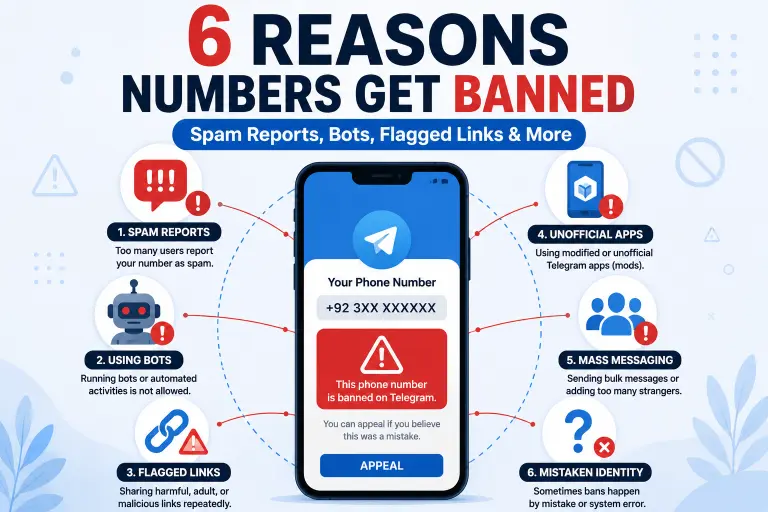
Telegram bans numbers for activity its systems flag as abusive or against its terms of service. The most common causes include:
- Spam reports. Sending similar messages to many people, or being mass-reported by other users, even if unintentional
- Bot-like or automated behavior. Using unofficial clients, scripts, or bots that perform rapid, repetitive actions
- Sharing flagged links or files. Distributing content Telegram’s systems identify as malicious, phishing-related, or harmful
- Illegal content in groups. Being active in groups or channels involved in scams, piracy, or other content that violates local or platform-wide rules
- Using unofficial or modified Telegram apps. Third-party clients that don’t follow Telegram’s official API guidelines can trigger enforcement action
- Mistaken identity or a false positive. Sometimes the system flags an account incorrectly, especially if a previous owner of the phone number caused the issue before you had it
If you genuinely don’t recognize any of these behaviors on your account, that’s worth stating clearly in your appeal — mistaken bans are one of the more common categories that get reversed.
Is This a Permanent Ban or Can It Be Reversed?
It depends on what caused it. Telegram doesn’t treat every ban the same way:
- Unclear or mistaken bans — triggered by a false positive, a previous number owner’s behavior, or unclear circumstances — have a real chance of being reversed through an appeal
- Confirmed, serious violations — verified illegal content, confirmed spam operations, or repeated violations after prior warnings — are typically final, and appeals for these rarely succeed
There’s no way to know in advance which category your case falls into, which is exactly why submitting a clear, honest appeal matters more than guessing.
How Do I Appeal a Banned Telegram Phone Number?
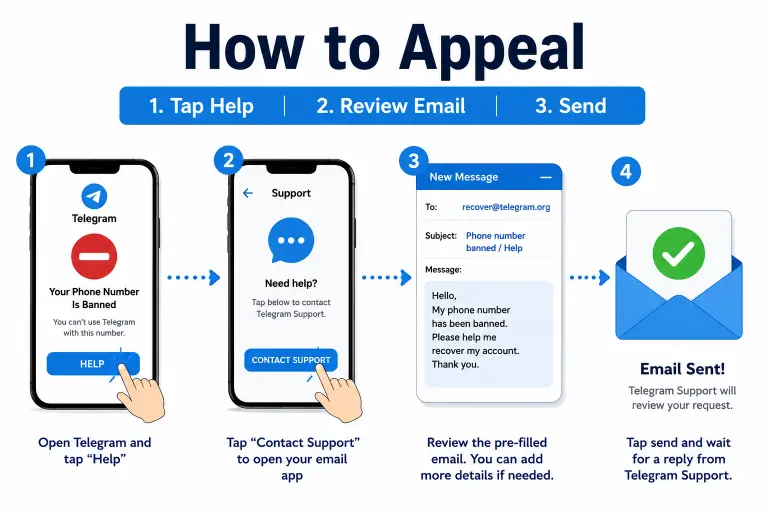
- Open the Telegram app and attempt to log in with the banned number until you see the ban message
- Tap “Help”, which appears below the ban notification on the screen
- Let it generate an appeal email automatically — this opens your device’s email app with a pre-filled message addressed to Telegram’s support team
- Send it as-is, or add a brief, honest explanation of your situation if the pre-filled text doesn’t cover it
- If the Help button doesn’t generate an email automatically, compose one manually and send it to Telegram’s official support address, including your full phone number with country code and a short explanation
- Wait for a response rather than sending multiple appeals back-to-back
Important: Keep your appeal honest and specific. A vague, copy-pasted message asking to be unbanned “please help” is far less effective than a short explanation of your actual situation — for example, that you don’t recognize the flagged activity, or that you recently acquired a previously-used number.
How Long Does a Telegram Ban Appeal Take?
Telegram doesn’t publish an official response window, but based on common experience, expect the process to take days rather than hours. Some appeals get resolved within about a week; others take longer, particularly if Telegram’s support team is reviewing a high volume of cases.
Avoid sending repeated, duplicate appeals in a short window. Telegram’s systems can flag rapid, repetitive submissions as spam themselves, which can slow down review rather than speed it up. One clear, well-written appeal is more effective than several rushed ones.
What Happens to My Messages and Groups If I’m Banned?
While your number is banned, your account becomes inaccessible — you can’t log in, send messages, or view your chats. Your data isn’t automatically deleted the moment the ban takes effect, but you also have no way to reach it until the ban is either lifted or you take further action.
If the ban is ultimately reversed through a successful appeal, your account, messages, groups, and contacts typically remain intact, since a ban restricts access rather than erasing data outright. If the ban stands and isn’t reversed, that account and its data effectively become permanently unreachable tied to that phone number.
Can I Use the Same Number to Register a New Account Instead?
Generally, no — a banned phone number is blocked from registering a new account, not just logging into the old one, since the block applies at the number level. Trying to register fresh with the same number while it’s actively banned typically just returns the same ban message.
This is a different situation from intentionally deleting an old account and reusing the same number afterward, which Telegram does allow under normal circumstances. If that’s what you’re trying to do — rather than recovering from an active ban — see our guide on deleting a Telegram account and reusing the same phone number instead.
How to Avoid Getting Banned Again
Once you’re back in, a few habits go a long way toward keeping it that way:
- Avoid sending the same or similar message to a large number of contacts in a short period
- Only use the official Telegram app, downloaded from Telegram’s own site or your device’s official app store
- Leave groups or channels that share flagged, illegal, or clearly spam-related content
- Don’t add or message large numbers of unfamiliar contacts in a short window
- Be cautious about which links and files you forward, especially from unfamiliar sources
Frequently Asked Questions
What’s the difference between a banned number and the “Too Many Attempts” error?
“Too Many Attempts” is a temporary cooldown that clears on its own within hours. A phone number ban is a platform-level block that doesn’t expire on its own — you need to appeal through Telegram’s official channels to have any chance of recovery.
Can I appeal a Telegram ban more than once?
Yes, but avoid submitting multiple appeals rapidly in a short window. If your first appeal doesn’t get a response after a reasonable wait, one clear follow-up is fine — repeated spam appeals can slow down review instead of helping.
Does Telegram tell you exactly why your number was banned?
Not usually. The ban message itself doesn’t specify a reason, which is part of why a clear, honest appeal explaining your situation is important — it gives Telegram’s review team context they wouldn’t otherwise have.
Can I get my number unbanned faster by paying for Telegram Premium?
There’s no official confirmation that a Premium subscription guarantees faster ban resolution. Some users report it may modestly help with account standing generally, but it isn’t a reliable shortcut around an active ban.
Will creating a new account with a different number work while my original is banned?
Yes, a different, never-banned phone number can register a new account normally. This doesn’t restore your original banned account or its data — it’s a separate, new account entirely.
Is a ban tied to my phone number or my Telegram account specifically?
It’s tied to the phone number. That’s why the same number can’t be used to register a fresh account while the ban is active — the block applies at the number level, not just to the original account tied to it.
If what you’re actually dealing with is a temporary lockout rather than a full ban, check the exact wording of your error message — our guide to Telegram’s “Too Many Attempts” error covers that separate, less serious issue. And if you suspect your account was banned because it was compromised and used by someone else rather than by your own activity, see our guide on deleting a hacked Telegram account for next steps.
DeleteAccountGuide.com is not affiliated with Telegram. This guide is for informational purposes only. Steps may vary slightly depending on your app version, and no recovery outcome is guaranteed.

Alex Mu is a digital technology writer focused on Telegram, account management, online privacy, and app troubleshooting. Through clear, practical guides, Alex helps readers understand digital platforms, manage their accounts, and resolve common technical issues. His work emphasizes accurate information, simple explanations, and step-by-step solutions that readers can follow with confidence.


