Last Updated: 2026
Quick Answer: Yes, my.telegram.org is safe — it’s Telegram’s own official developer portal, used to generate API credentials for building apps that connect to Telegram. It’s not a separate or third-party service, and logging in only requires the same phone number and code you already use for the Telegram app. The main risk isn’t the site itself; it’s lookalike phishing pages and careless handling of the credentials it issues.
Key Facts
- my.telegram.org is owned and operated by Telegram, not a third party.
- It’s officially called “Telegram Core” inside the portal itself.
- Its main purpose is issuing an api_id and api_hash for developers building apps or bots.
- Logging in uses the same phone number and confirmation code as the regular app — no separate password.
- Sessions created through this portal show up in your Active Sessions list, just like any other login.
- The real danger comes from fake copycat sites, not the genuine domain.
What Is my.telegram.org, Exactly?
my.telegram.org is Telegram’s official web portal for developers. It’s the place people go to register an application and get the credentials needed to build software that talks to Telegram’s servers.
That’s it. It’s not a settings page for regular users, it’s not a payment portal, and it doesn’t ask for anything beyond what the Telegram app already knows about you. If you’ve never tried to build a bot, script, or third-party app, you likely have no reason to visit it at all.
The confusion usually starts because the site looks unfamiliar and sits outside the app itself, which makes it feel like something separate from Telegram. It isn’t. It’s hosted on Telegram’s own infrastructure and run by the same company.
Why Does my.telegram.org Ask for My Phone Number?
Because that’s how Telegram verifies you’re a real, existing account holder — the same way the app itself confirms your identity.
When you visit the site, it asks for your phone number, then sends a one-time login code through the Telegram app (or SMS if needed). You type that code in, and you’re logged into “Telegram Core,” the developer dashboard tied to your account.
No extra password. No separate account to create. It’s the same verification flow you already trust from signing into Telegram on a new device.
Is It Safe to Enter Your Phone Number on my.telegram.org?
Yes, as long as you’re on the correct domain. Entering your number here carries the same risk as logging into the Telegram app itself, because it’s the exact same account and the exact same verification system.
The real safety question isn’t about the phone number — it’s about making sure you’re actually on my.telegram.org and not a copycat domain designed to look like it. Phishing pages that mimic legitimate login screens are common across the internet, and Telegram’s developer portal isn’t immune.
Before entering anything, check that:
- The URL reads exactly my.telegram.org, with no extra words, numbers, or hyphens.
- The connection shows a valid HTTPS lock icon in your browser.
- You reached the site by typing it yourself or from an official Telegram link, not a message or ad.
What Are api_id and api_hash, and Why Do They Matter for Security?

These are the two credentials my.telegram.org generates once you fill out the “API development tools” form. Together, they let an app or script authenticate as your account when talking to Telegram’s servers.
Treat them like a password, not a username. Anyone who has both values, combined with access to your login session, could potentially build tools that act on your account’s behalf. Telegram’s own documentation warns developers never to share these publicly or hardcode them into apps other people can see.
A few practical rules:
- Never paste your api_hash into public forums, GitHub repos, or chat groups.
- Only enter these credentials into software you trust and understand.
- Each phone number gets one api_id, so if you’re worried a credential leaked, regenerating isn’t as simple as clicking a button — you’ll need to review what’s using it first.
Does Using my.telegram.org Put My Regular Telegram Account at Risk?
Not by itself. Visiting the site and generating credentials doesn’t weaken your account’s security. The risk shows up later, based on what you do with those credentials — specifically, which third-party tools or bots you authorize to use them.
If you connect a shady script or an untrusted bot to your api_id and api_hash, that tool can technically read messages, send messages, or take other actions as you, depending on how it’s built. The portal itself is just the key-issuing counter. What matters is who you hand the key to afterward.
Does my.telegram.org Store or Share My Data?
The portal only holds what’s needed to run the developer tools: your phone number for login, and the app details you submit when creating an api_id, like an app name and short description. It doesn’t add new data collection on top of what the main Telegram app already has.
Telegram states that developer credentials and app registrations aren’t sold or shared with outside advertisers. That said, the apps and bots you choose to connect using your api_id can request permissions well beyond what Telegram’s own privacy settings control — so the data exposure risk sits with the third-party software you authorize, not with my.telegram.org itself.
If privacy is a top concern, the simplest safeguard is restraint: only register an application if you’re actually building or testing one, and avoid handing your credentials to tools whose source or purpose you can’t verify.
my.telegram.org Safety Checklist
| Check | Why It Matters |
|---|---|
| Confirm the exact domain spelling | Blocks phishing lookalikes |
| Look for HTTPS before logging in | Confirms an encrypted connection |
| Only use credentials in trusted software | Prevents unauthorized account access |
| Review Active Sessions after generating an API key | Confirms no unexpected logins |
| Enable Two-Step Verification on your main account | Adds a password layer beyond SMS codes |
| Never share your api_hash publicly | Stops others from impersonating your app |
How Do I Know If a “Telegram Developer” Site Is Fake?
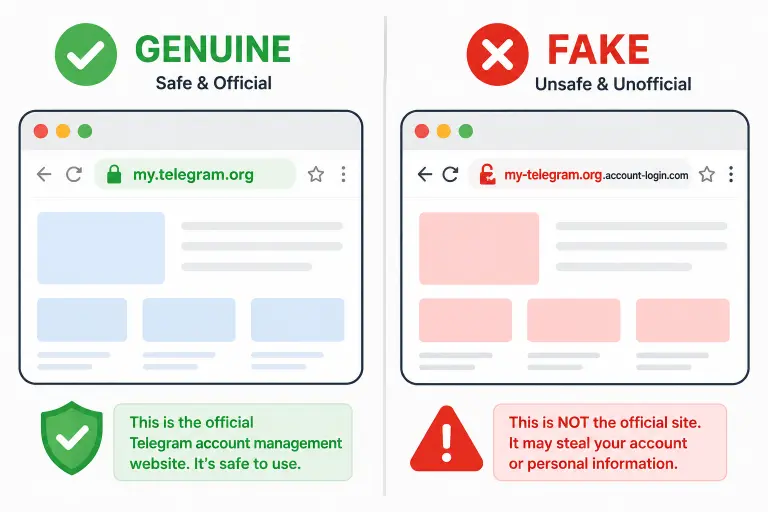
Scammers sometimes build pages that copy the look of my.telegram.org to steal login codes. A few warning signs give them away:
- The domain isn’t exactly my.telegram.org — watch for extra characters, different endings like .net or .info, or subtle misspellings.
- It asks for information Telegram never requests, like your Two-Step Verification password directly on the login screen.
- You arrived via an unsolicited link in an email, DM, or ad promising free premium features or “verification.”
- The design looks slightly off — outdated fonts, broken layout, or missing the standard Telegram Core branding.
If anything feels wrong, close the tab and navigate to the site manually by typing the address yourself.
What Should I Do If I Think I Entered My Info on a Fake Site?
Act quickly. Open the real Telegram app, go to Settings > Privacy and Security > Active Sessions, and end any session you don’t recognize. Then change your Two-Step Verification password immediately, since that’s the one credential a phishing page can’t reuse if you rotate it in time.
If you don’t have Two-Step Verification set up yet, this is the moment to enable it — it adds a password layer that a stolen SMS code alone can’t bypass.
Is my.telegram.org Necessary for Regular Telegram Users?
No. If you only use Telegram to chat, join groups, or follow channels, you’ll likely never need to visit this portal. It exists specifically for people building software — bots, custom clients, automation tools, or integrations — not for everyday account management.
Regular settings like privacy controls, blocked contacts, or two-step verification all live inside the Telegram app itself, not on my.telegram.org.
Frequently Asked Questions
Is my.telegram.org an official Telegram website?
Yes. It’s Telegram’s own developer portal, referred to internally as “Telegram Core.” It isn’t run by a third party or affiliated developer group.
Can someone hack my account just by knowing I used my.telegram.org?
No. Simply having visited the portal reveals nothing about your account. Risk only comes from sharing the api_id/api_hash it generates, or from entering your login code on a fake copycat site.
Do I need to visit my.telegram.org to use Telegram normally?
No. It’s only needed if you’re developing a bot, script, or custom app that connects to Telegram’s API. Regular messaging, privacy settings, and account management happen inside the app itself.
Why does my.telegram.org look different from the regular Telegram app?
It’s a separate web dashboard built for developers, so its design and layout differ from the consumer app. That’s expected and doesn’t indicate anything unsafe, as long as the domain is correct.
Can I revoke access if I generated an api_id I no longer trust?
You can review and end related sessions from Active Sessions in the app, and stop using the credential in any software you control. Telegram doesn’t offer a one-click “delete api_id” button, so the safest move is discontinuing its use and monitoring your account.
Is it safe to enter my Two-Step Verification password on my.telegram.org?
Only if you’re on the genuine domain and the portal is specifically prompting for it as part of your normal login. Never enter that password on a page you reached through an unsolicited link.
What happens if I ignore a suspicious “my.telegram.org” login prompt?
Nothing happens to your real account. Ignoring or closing a suspicious prompt is always the safer choice — legitimate Telegram processes won’t be affected by declining to interact with a fake page.
If you’re troubleshooting errors instead of safety concerns, see our guide on fixing my.telegram.org login and portal errors. For locking down your account further, check our guides on Telegram two-step verification and reviewing your active sessions.
DeleteAccountGuide.com is not affiliated with Telegram. This guide is for informational purposes only. Steps may vary slightly depending on your app version.

Alex Mu is a digital technology writer focused on Telegram, account management, online privacy, and app troubleshooting. Through clear, practical guides, Alex helps readers understand digital platforms, manage their accounts, and resolve common technical issues. His work emphasizes accurate information, simple explanations, and step-by-step solutions that readers can follow with confidence.


