
Last Updated: May 2026
Quick Answer: Whether you can delete a hacked Telegram account depends entirely on what access you still have. If you still control your phone number or have an active session on another device, you can recover and then delete the account through Telegram’s official deactivation page. If the hacker changed your phone number and you have no active session, your options become very limited and Telegram support cannot delete the account for you.
Key Facts
- Recovery depends entirely on access — your phone number or an active session is the key to everything
- Telegram support cannot delete a hacked account on request without identity verification
- An active session on any device lets you remove the hacker and secure the account
- If the hacker changed your phone number, recovering it from your carrier is your first priority
- A truly abandoned account may eventually be removed by Telegram’s inactivity system, but this should never be your plan
Discovering your Telegram account has been hacked is a deeply unsettling moment. Maybe you noticed messages you never sent, or you tried to log in and your password no longer works, or worse — your contacts are messaging you asking why you sent them a strange link. The panic is real, and the questions come fast. Can you get back in? Can you just delete it and walk away? What if the hacker locked you out completely?
The honest answer is that what you can do depends entirely on what access you still have right now. This is different from a standard account deletion, and it is different from losing your phone number through a carrier issue. A hacked account involves someone else actively controlling or having controlled your account, which changes the entire approach.
This guide walks through every realistic scenario — from the best case where you still have access, to the worst case where the hacker changed everything. No false promises about magic recovery tools, no myths about Telegram support bypassing security. Just the real options available to you in 2026.
First, Determine What Access You Still Have
The correct path forward depends entirely on what you can still access right now. Before taking any action, figure out exactly where you stand.
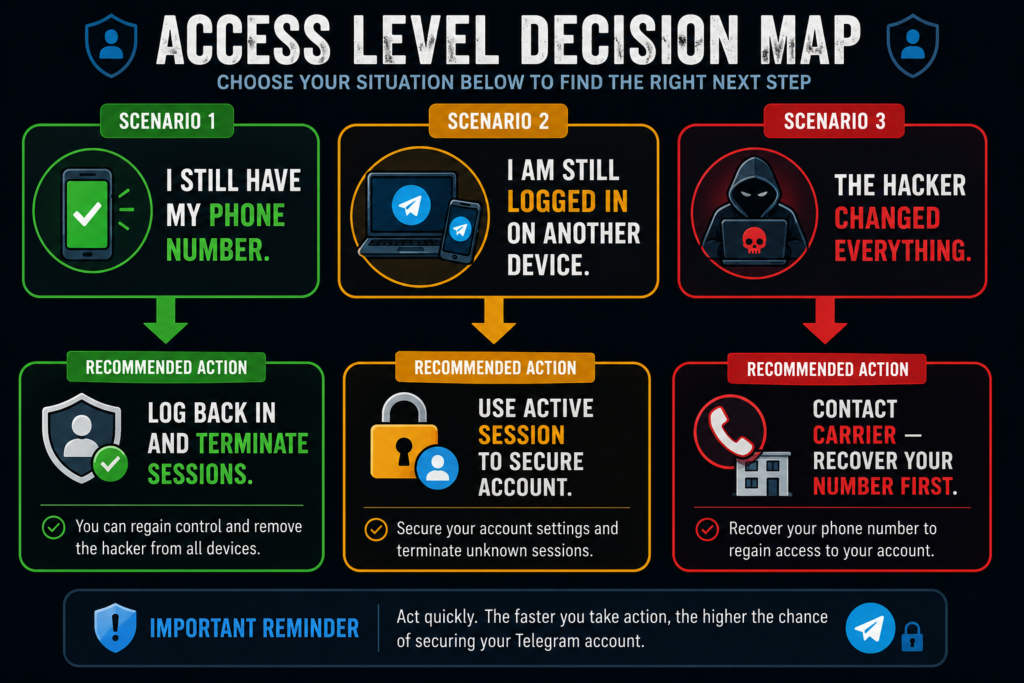
You Still Have Your Original Phone Number
This is the best-case scenario with the highest chance of full recovery. If you still control the phone number linked to your Telegram account, you have the strongest path back in. Telegram’s login system is built around phone number verification, so retaining control of that number means you can almost always regain access, even if the hacker changed your password or enabled their own security settings.
You’re Still Logged In on Another Device
An active Telegram session on any device — a tablet, an old phone, a desktop computer — is a powerful asset even if your main account feels compromised. That session gives you direct access to account settings, allowing you to terminate the hacker’s session, change your security settings, and decide whether to keep or delete the account, all without needing to go through phone verification again.
The Hacker Changed Your Phone Number
This is the most difficult situation a user can face. If the attacker gained enough access to change the phone number associated with your account, you have effectively lost your primary recovery method. Without the original number and without any active session, your ability to verify ownership through Telegram’s standard process becomes severely limited. This scenario requires a different approach, covered later in this guide.
How to Recover Control Before Trying to Delete the Account
Before jumping straight to deletion, focus on securing the account first. In most cases, recovering control is both possible and the smarter move — even if your end goal is deletion, you want to make that decision from a position of control, not panic.
Log In Again Using Your Phone Number
If you still control your original phone number, try logging into Telegram again using the standard login process. Enter your phone number, and Telegram will send a verification code via SMS or to an active session if one exists. This works because phone number ownership is Telegram’s primary form of identity verification — if a hacker changed your password but did not change your phone number, you can often log back in immediately using the code sent to your number.
If your password was changed and you are prompted for it, look for the option to reset your password or sign in using only the SMS code, bypassing the need for the old password entirely.
Terminate All Active Sessions
Once you are back in, the very first thing to do is remove the hacker’s access completely. Go to Settings, then Privacy and Security, then Active Sessions. You will see every device currently logged into your account, including any unfamiliar device the hacker used.
- Open Telegram Settings
- Tap Privacy and Security
- Tap Active Sessions or Devices
- Review the list for any device you do not recognize
- Tap Terminate All Other Sessions to remove every device except the one you are using right now
This step is critical and should be done immediately after regaining access — every minute the hacker’s session remains active is a minute they could still be reading your messages or sending content as you.
Enable Two-Step Verification Immediately
After clearing out unauthorized sessions, set up two-step verification right away to prevent the attacker from getting back in. Two-step verification adds a password requirement on top of the SMS code, meaning even if someone gains access to your phone number temporarily, they cannot log into your account without also knowing your password.
- Go to Settings
- Tap Privacy and Security
- Tap Two-Step Verification
- Create a strong password you have not used elsewhere
- Optionally add a recovery email in case you forget the password
Do this before you do anything else with the account — including deciding whether to delete it. Securing the account first protects you regardless of what you decide next.
How to Delete a Hacked Telegram Account If You Recover Access
Once you have regained control, removed the hacker’s sessions, and secured the account with two-step verification, deleting the account follows the same official process as any standard Telegram deletion.
- Sign in to your now-secured account
- Visit the official deactivation page at my.telegram.org/deactivate
- Enter your phone number and verify your identity with the confirmation code
- Review the final warning screen and confirm permanent deletion
For the complete walkthrough with screenshots and platform-specific instructions, see our full guide on how to delete your Telegram account permanently.
Important: Only proceed with deletion after you have confirmed the hacker no longer has any active session. Deleting the account while the hacker still has access does not protect you any further than securing it would — and if your goal is simply safety, securing the account with two-step verification may be the better choice over deletion.
What If You Cannot Recover the Account?
This is the situation that sets this guide apart from a standard deletion article. If you have no phone number access and no active session anywhere, your options narrow significantly.
Can Telegram Support Delete a Hacked Account?
No. Telegram support does not manually delete accounts on request, including accounts that have been hacked. This is consistent policy, not a case-by-case decision. Telegram support can offer general security guidance and may assist with certain abuse reports, but they cannot bypass their own identity verification system to delete an account on your behalf.
If you contact Telegram support about a hacked account you cannot access, expect them to direct you toward standard recovery steps — verifying your phone number or using an active session. If neither is available to you, support cannot create a workaround.
Can You Delete the Account Without Logging In?
No. Telegram requires identity verification before any account deletion, hacked or not. This is a deliberate security measure — without it, anyone could delete someone else’s account simply by claiming it was hacked. The verification requirement exists specifically to prevent this kind of abuse, which unfortunately means legitimate victims face the same barrier.
What Happens If You Simply Leave the Account?
If recovery is not currently possible, Telegram’s inactivity system becomes the only realistic backstop. Accounts that remain inactive for an extended period — 6 months by default — are automatically deleted by Telegram. If the hacker also stops using the account, or if their access naturally lapses, this system may eventually remove it.
This should never be your primary plan. While you wait for inactivity deletion, the hacker may still have active access to your contacts, your message history, and the ability to impersonate you. Relying solely on auto-deletion leaves that exposure in place for months. Use this time to actively pursue the other protective steps below instead of simply waiting.
Protect Yourself While Waiting
If full account recovery is not immediately possible, these steps reduce your risk while you work toward a solution.
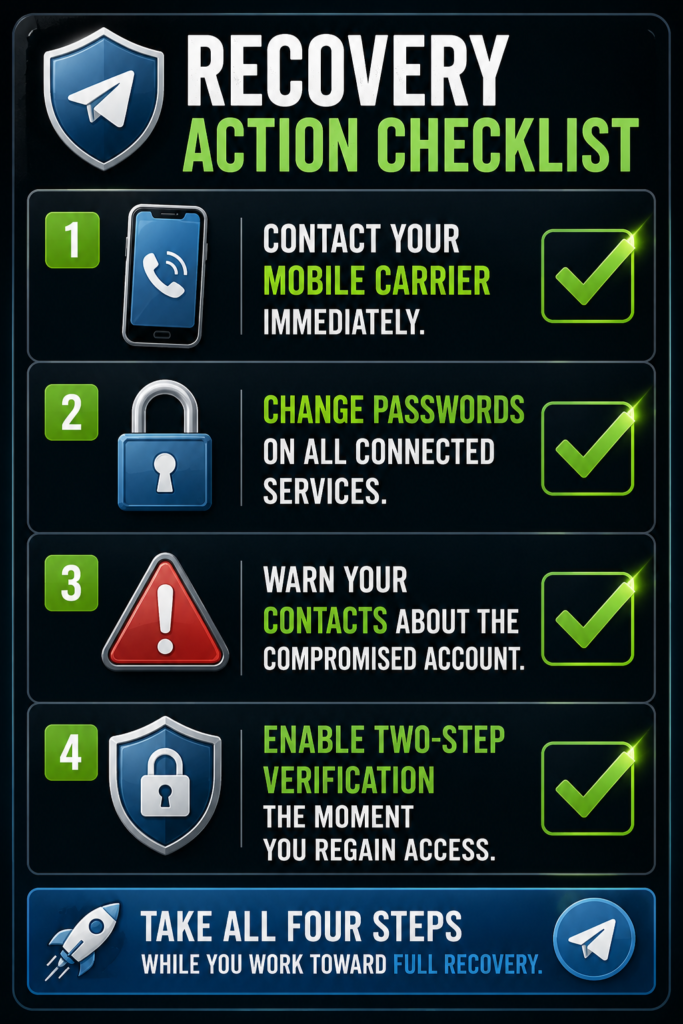
Contact Your Mobile Carrier
If your SIM card was hijacked or your phone number was ported without your consent — a tactic sometimes used alongside account hacking — contact your mobile carrier immediately. Explain that you suspect unauthorized SIM swapping or number porting. Carriers have fraud departments specifically for this. Recovering control of your phone number is often the single most important step toward recovering your Telegram account, since phone number ownership underlies Telegram’s entire verification system.
Change Passwords on Connected Services
A hacked Telegram account sometimes signals a broader compromise. Check whether your email account, which may have been used to facilitate the Telegram takeover, has also been compromised. Change your email password, enable two-factor authentication there as well, and review any other accounts that share login information or recovery methods with your phone number or email.
Warn Friends About the Compromised Account
While the hacker has access, they may message your contacts pretending to be you — often asking for money, sharing malicious links, or attempting further scams. Use whatever channel you have available — a different messaging app, a phone call, social media — to warn close contacts that your Telegram account has been compromised and not to trust messages from it until further notice.
Common Mistakes That Make Recovery Impossible
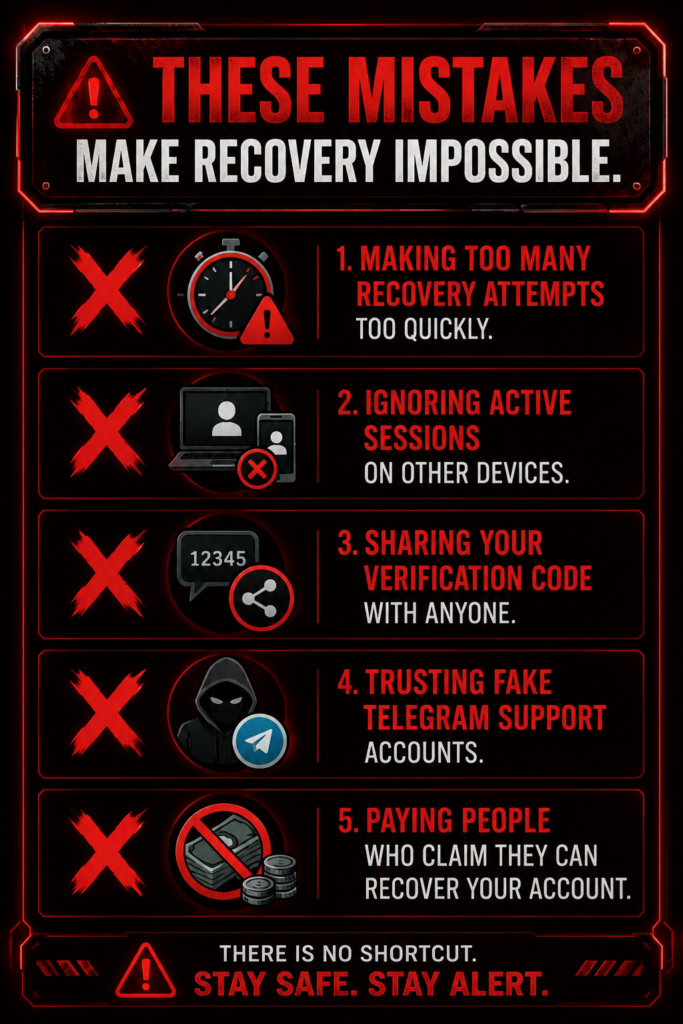
Avoiding these errors significantly improves your chances of getting your account back.
Creating multiple recovery attempts too quickly can trigger Telegram’s anti-abuse systems, leading to temporary lockouts that delay your legitimate recovery further. Space out your attempts and follow the official process carefully rather than repeatedly retrying.
Ignoring active sessions on other devices means missing your easiest path back into the account. Always check every device you have ever used before assuming you have no remaining access.
Sharing verification codes with anyone — including people claiming to be Telegram support — instantly compromises your recovery attempt. Telegram will never legitimately ask you to share your code with a third party.
Trusting fake Telegram support is a common trap. Scammers impersonate official support accounts, especially targeting users who are visibly searching for help after being hacked. Telegram’s official support only operates through verified in-app channels — never trust unsolicited messages offering to “recover” your account.
Paying people who claim they can recover hacked accounts is both risky and ineffective. There is no legitimate paid service that can bypass Telegram’s verification system. These offers are scams targeting people in a vulnerable, urgent situation.
Can You Create a New Telegram Account Instead?
Depending on your situation, starting fresh with a new account may be more practical than fighting for recovery.
| Situation | Recommended Action |
|---|---|
| Account recovered | Secure it with two-step verification, or delete it if you no longer want it |
| Phone number recovered | Create a new account if you prefer a clean start |
| Number permanently lost | Obtain a working number first before attempting to register again |
| Hacker still controls account | Focus on securing your phone number before creating any new account |
If you ultimately recover your phone number but decide the old account is too compromised to trust, creating a new Telegram account is a completely valid path forward. Just be aware this starts you with a clean slate — no old messages, contacts, or groups carry over. For full details on this process, see our guide on creating a new Telegram account with the same phone number.
Frequently Asked Questions
Can I delete a hacked Telegram account if I cannot log in?
Usually no. Telegram requires identity verification before allowing account deletion. Without access to your account or phone number, your options are extremely limited, and deletion through the official process is not possible until you regain some form of verified access.
Can Telegram support delete my hacked account?
No. Telegram generally does not manually delete accounts on request, including hacked ones. They may assist with security issues and abuse reports, but you must verify ownership through the standard process before any account changes can be made.
What if the hacker changed my phone number?
If the phone number linked to your account has been changed and you have no active session, recovering or deleting the account becomes very difficult. Your first priority should be recovering your original phone number from your mobile carrier, since that number is the key to Telegram’s verification system.
Can I remove the hacker if I’m still logged in on another device?
Yes. If you still have an active Telegram session, you can terminate all other sessions, secure your account, and change your security settings before deciding whether to keep or delete the account. This is one of the strongest recovery paths available.
Will a hacked Telegram account eventually delete itself?
If the account remains inactive long enough, Telegram’s automatic inactivity policy — 6 months by default — may eventually delete it. However, this should not be relied upon as your primary plan, since the hacker may retain access and cause harm during that waiting period.
Is creating a new Telegram account safer than trying to recover the hacked one?
If you regain control of your phone number, creating a new account can be a good option for a fresh start. However, secure your compromised account first whenever possible, since an unsecured hacked account left active can still be used to impersonate you or harm your contacts.
Can a hacker read my old Telegram messages?
If they successfully accessed your account before you secured it, they may have been able to view your chats, contacts, and media during that period of access. After regaining control, review your account activity carefully and assume any sensitive information visible during that window may have been seen.
Conclusion
Recovering or deleting a hacked Telegram account comes down to one central question: what access do you still have? If you retain your phone number or have an active session anywhere, you have a real path to recovery — terminate the hacker’s sessions, enable two-step verification, and then decide whether to keep the account secured or delete it through the official process.
If the hacker changed your phone number and no active session remains, your priority shifts to recovering that number through your mobile carrier. Telegram support cannot bypass identity verification to delete the account for you, and relying on automatic inactivity deletion should only ever be a last resort while you actively pursue recovery.
Whatever path you are on, protect yourself in the meantime. Warn your contacts, secure your connected accounts, and never trust anyone offering to recover your account for payment or asking for your verification code.
DeleteAccount.com is not affiliated with Telegram. This guide is for informational purposes only. Steps may vary slightly depending on your app version.

Alex Mu is a digital technology writer focused on Telegram, account management, online privacy, and app troubleshooting. Through clear, practical guides, Alex helps readers understand digital platforms, manage their accounts, and resolve common technical issues. His work emphasizes accurate information, simple explanations, and step-by-step solutions that readers can follow with confidence.


