
Last Updated: May 2026
TL;DR Quick Answer: You can delete your Telegram account without receiving a confirmation code if you still have Telegram logged in on another device — the code arrives inside the app, not always by SMS. If you have no active sessions at all, your best option is Telegram’s built-in inactivity auto-delete timer. There is no way to bypass verification entirely for security reasons.
Key Facts
- Telegram sends the verification code inside the Telegram app, not via SMS, in most cases
- If you have any active Telegram session on any device, you can still complete deletion
- Telegram’s auto-delete inactivity timer can be set to 1 week, 1 month, 6 months, or 1 year
- Telegram support cannot manually delete your account — verification cannot be bypassed by request
- Uninstalling the Telegram app does not delete your account
- A deleted Telegram account cannot be recovered — deletion is permanent
Getting stuck on the confirmation code step is one of the most frustrating Telegram problems users report. The code never shows up in your SMS inbox, you are logged out of the app, or your old SIM is long gone. You just want the account gone and the process feels impossible.
The problem is almost always a misunderstanding about how Telegram sends verification codes — and once that is cleared up, most users find they can still complete deletion. This guide covers three working methods for 2026 and explains exactly what to do based on your specific situation.
Why Does Telegram Require a Confirmation Code Before Deletion?
Telegram requires a confirmation code to verify that the person requesting deletion actually owns the account. Without this check, anyone who knew your phone number could delete your account without your permission. The code is Telegram’s way of confirming account ownership before taking an irreversible action.
Telegram Sends Codes Inside the App — Not SMS
This is the biggest source of confusion for users trying to delete their accounts. Telegram does not default to SMS for verification codes. Instead, it sends the code as a message from the official Telegram account inside the app itself.
When you enter your phone number on my.telegram.org/deactivate, Telegram looks for active sessions on your devices. If any device is logged in, the code goes to the Telegram app on that device first. SMS is only used as a fallback — and even then, it does not always trigger automatically.
If you are looking at your SMS inbox and seeing nothing, that is why. The code is almost certainly sitting inside your Telegram app on another device.
Why Telegram Blocks Unauthorized Deletion Attempts
Telegram accounts are often linked to sensitive personal data — private conversations, business contacts, channel memberships, and financial information shared in chats. Allowing account deletion without ownership verification would be a serious security vulnerability. The confirmation code system protects users from having their accounts deleted by bad actors who only know their phone number.
This is also why Telegram support will not bypass verification on request — doing so would create the exact security gap the system is designed to prevent.
Situations Where Users Cannot Access the Code
There are four common situations where users genuinely cannot receive the confirmation code:
- Lost or broken phone — The device where Telegram was logged in is inaccessible
- Logged out of all devices — No active Telegram session exists to receive the in-app code
- SIM card deactivated or number changed — The phone number is no longer active, blocking SMS fallback
- Hacked account — An attacker has changed sessions or taken over active devices
Each situation has a different set of options, which the three methods below address directly.
Method 1 — Delete Telegram Account Using an Active Logged-In Session
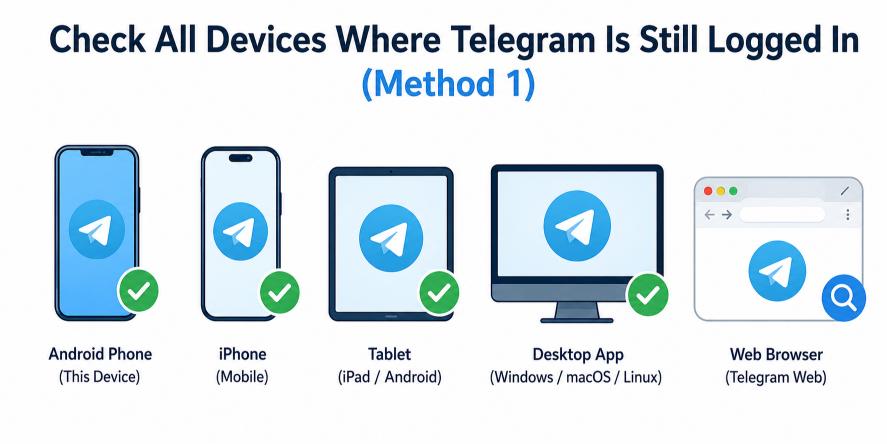
This is the easiest and most reliable method, and it works for the majority of users who think they cannot receive a code. If Telegram is still logged in anywhere — on an old phone, a tablet, a laptop, or even a browser session — you can receive the verification code there and complete deletion normally.
| Where to Check | What to Look For |
|---|---|
| Second smartphone | Telegram app still installed and logged in |
| Tablet | Telegram app open with notifications enabled |
| Telegram Desktop (PC/Mac) | Desktop app running or last used recently |
| Browser session | my.telegram.org previously accessed and still active |
Check All Devices Where Telegram Is Still Logged In
Before assuming you cannot receive the code, check every device you own or have previously used:
- Check a second phone — If you upgraded your device, Telegram may still be logged in on the old one.
- Check a tablet — iPads and Android tablets running Telegram are common overlooked sources.
- Check Telegram Desktop — The Windows or Mac desktop app maintains its session independently of your phone. Open it and check for messages from the official Telegram account.
- Check active web sessions — If you ever logged into web.telegram.org, that session may still be active. Open it in a browser and check your messages.
You can also see all your active sessions by going to Settings > Privacy and Security > Active Sessions on any device where you are still logged in. This shows every device currently connected to your account.
Open the Official Telegram Delete Page
Once you have confirmed an active session exists somewhere, proceed to the official deletion page:
- Open any browser on your phone or computer.
- Go to https://my.telegram.org/deactivate.
- Enter your phone number in international format — for example, +12125550100 for a US number.
- Click Next.
Use the In-App Code From the Active Session
- After submitting your phone number, Telegram will send the verification code to your active Telegram session.
- Open the Telegram app (or Telegram Desktop, or web.telegram.org) on the device where you are still logged in.
- Look for a new message from the Telegram official account — it will contain a 5-digit code.
- Copy the code.
- Return to the my.telegram.org/deactivate page in your browser.
- Enter the code in the verification field and click Sign In.
Confirm Permanent Account Deletion
- After signing in, you will reach the account deactivation screen.
- Read the warning. Telegram will show you exactly what is about to be permanently deleted — messages, media, contacts, groups, and channel memberships.
- You may see an optional field asking why you are leaving. Fill it in or skip it.
- Click Delete My Account.
Your account is now permanently and irreversibly deleted. All your data is removed from Telegram’s servers immediately. This cannot be undone.
Method 2 — Use Telegram’s Auto-Delete Inactivity Feature
If you have completely lost access to your phone number and have no active Telegram sessions on any device, Telegram’s built-in inactivity timer is your most realistic option. This method does not require a confirmation code — it simply removes the account automatically after a period of inactivity.
What Is Telegram’s “If Away For” Feature?
Telegram has a built-in account self-destruct setting called “If Away For.” It automatically deletes your account if you do not log in for a specified period of time. This feature was designed for users who want their account removed eventually without manual action — and it is also the best fallback for users who cannot receive a verification code.
The setting is found at: Settings > Privacy and Security > If Away For
Default Auto-Delete Time Explained
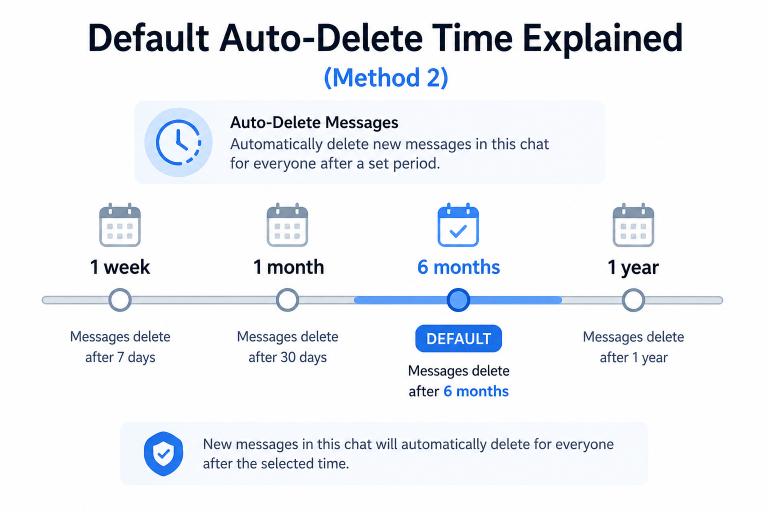
Telegram’s default inactivity deletion period is 6 months. This means if you never set a custom timer, your account will be automatically deleted after approximately 6 months of not logging in.
The available options are:
| Inactivity Period | How It Works |
|---|---|
| 1 week | Account deleted after 7 days without login |
| 1 month | Account deleted after 30 days without login |
| 6 months | Telegram’s default setting |
| 1 year | Account deleted after 12 months without login |
If you still have access to your account right now, set the timer to 1 week or 1 month before you lose access — this speeds up the eventual deletion significantly.
How Long It Takes for Telegram to Remove the Account
If you set the inactivity timer yourself, the account will be deleted within the period you selected after your last login. If you never adjusted the setting, the default 6-month timer applies.
Telegram does not send notifications before auto-deleting an account. The deletion simply happens after the period expires and you have not logged in.
Once auto-deleted, the account is treated the same as a manually deleted account — all messages, contacts, and group memberships are permanently removed.
Important Limitations of This Method
Be aware of the following before relying on auto-deletion:
- This method is not immediate. If you need the account deleted today for privacy or security reasons, the inactivity method will not satisfy that urgency.
- You must have already set the timer (or accept the 6-month default) — you cannot trigger auto-deletion remotely if you are fully locked out.
- The account remains active and visible to other Telegram users until the timer expires and deletion occurs.
- Your data stays on Telegram’s servers until the account is deleted.
If urgency is your concern and you are completely locked out, see Method 3 and the alternatives section at the end of this guide.
Method 3 — Delete a Hacked Telegram Account Without the Confirmation Code
If your Telegram account has been hacked, the situation is more serious — and the options are genuinely limited. This method addresses hacked-account scenarios specifically, because the intent and urgency are different from simply losing access to a phone number.
If the Hacker Changed Your Number or Sessions
When a hacker takes control of a Telegram account, they often terminate all other active sessions (cutting off your access) and may link the account to a different phone number. If either of these has happened:
- You will not be able to receive the verification code at your original number if the account has been re-linked.
- You cannot use active session recovery (Method 1) if all your sessions were terminated.
- The my.telegram.org/deactivate page will only work with the phone number currently linked to the account — which may no longer be yours.
This is a significant limitation. There is no remote override for a fully compromised account.
Try Recovering Access First
Before accepting that deletion is impossible, try these recovery steps:
- Check if your SIM is still active. If the hacker did not port your number away, your SIM may still receive the verification code via SMS fallback. Try the deletion process from my.telegram.org/deactivate and wait up to 5 minutes for an SMS.
- Check all your devices immediately. If the hacker terminated sessions recently, a device that was just logged out may still have a brief window to retrieve a code.
- Check Telegram Desktop. Desktop sessions are sometimes overlooked by attackers. If your PC version is still logged in, use Method 1 immediately.
- Contact your mobile carrier. If the hacker ported your phone number to a new SIM (SIM swap attack), contact your carrier to reverse the port and restore your number. This can restore your ability to receive SMS verification.
Contact Telegram Support for Security Issues
Telegram provides a support contact at https://telegram.org/support for reporting security and hacked-account issues.
What Telegram support can do:
- Acknowledge and flag the security report
- Provide general guidance on account recovery steps
- In some cases, assist with terminating unauthorized active sessions if identity can be sufficiently verified
What Telegram support cannot do:
- Manually delete your account without verification
- Bypass the phone number confirmation requirement
- Recover a deleted account
- Guarantee any specific outcome or timeline
Be realistic about support response times. Telegram support handles a high volume of requests. Response times can range from a few days to several weeks. If immediate account deletion is critical for your safety, focus on the recovery steps above while waiting for a response.
What Happens If Recovery Is Impossible
If you cannot regain access through any method:
- The 6-month inactivity auto-delete will eventually apply if the hacker also does not use the account. Most attackers do not maintain long-term use of compromised accounts.
- You can report the account as compromised through Telegram’s abuse reporting tools, which may trigger a review.
- Remove the account’s connection to any linked services — if you used Telegram Login for other apps, revoke those connections through each app’s settings independently.
The hard truth is that a fully compromised Telegram account with no accessible sessions and a ported number leaves very few options. Focusing on securing your phone number through your carrier is the most important first step.
Common Reasons Telegram Confirmation Codes Do Not Arrive
Most cases where the confirmation code does not arrive have a straightforward explanation. Here is a breakdown of the most frequent causes.
| Reason | Explanation | Fix |
|---|---|---|
| Looking at SMS inbox | Telegram sends code to the app first | Open Telegram app on any active device |
| Logged out everywhere | No active session to receive in-app code | Use SMS fallback or inactivity method |
| Too many attempts | Temporary lockout after multiple wrong codes | Wait 24 hours before trying again |
| VPN blocking the page | Some VPN nodes block Telegram domains | Disable VPN and retry |
| Browser cache issue | Old session data interfering with the page | Clear cache and reload |
| Weak signal or no data | SMS fallback cannot reach the device | Switch to Wi-Fi or move to better coverage |
Waiting for SMS Instead of In-App Code
The most common mistake is checking the SMS inbox and waiting there while the code has already arrived inside the Telegram app. Telegram’s default behavior is to send verification codes as in-app messages, not SMS texts. Check the Telegram app on every device you own before concluding the code was not sent.
Logged Out of All Devices
If you are logged out of Telegram on every device, there is no active session to receive the in-app code. In this case, Telegram will attempt to send the code via SMS to your registered phone number. Check your SMS inbox, and make sure the number is active and able to receive texts.
Too Many Verification Attempts
Entering the wrong code multiple times triggers a temporary lockout. Telegram will block further code requests for up to 24 hours. Do not attempt to request or enter codes during this period — it will extend the lockout. Wait the full 24 hours, then start the process fresh.
VPN or Browser Problems
Some VPN exit nodes are blocked by Telegram’s infrastructure. If my.telegram.org/deactivate is not loading or is returning an error, try the following:
- Disable your VPN entirely.
- Clear your browser’s cache and cookies.
- Try a different browser.
- Try switching between Wi-Fi and mobile data.
Things to Try Before Giving Up on the Confirmation Code
Before moving to alternative methods, work through this checklist. Most users who think they cannot receive a code find it after going through these steps.
Check Telegram Notifications on Every Device
Go through every device you own systematically:
- Primary phone — Is Telegram installed? Is it logged in? Check the Telegram messages inbox, not your SMS app.
- Old phones — Power on any old device and check if Telegram is still installed and logged in.
- Tablets — Check iPad or Android tablet for an active Telegram session.
- Telegram Desktop (PC or Mac) — Open the desktop app. Check the official Telegram message for a verification code.
- web.telegram.org — Open this in a browser. If it loads your account without asking you to log in, you have an active web session and can retrieve the code there.
Request the Code Again After Waiting
If the first code request produced nothing, wait at least 2 to 3 minutes before requesting again. Delivery delays are common, especially for in-app messages when the device is in sleep mode.
If you have already made multiple failed attempts and triggered a lockout, wait the full 24 hours before trying again. Attempting to rush through the lockout will not help and may extend the waiting period.
Use Another Browser or Device
If the my.telegram.org/deactivate page is behaving unexpectedly, switch environments:
- Try Chrome if you are currently using Safari or Firefox.
- Try a different device entirely — use your phone if you were on a PC, or vice versa.
- Open the page in an incognito or private browser window to rule out extension conflicts.
Reinstall Telegram Carefully
Reinstalling Telegram on your phone does not automatically log you out — in many cases, your session is preserved. If the Telegram app was accidentally closed or had a notification issue, reinstalling it and reopening it may reveal the verification code waiting in your messages.
Important: On some devices, uninstalling Telegram before reinstalling can terminate your active session, which would eliminate the ability to receive the in-app code. Only reinstall if you are confident the session issue is causing the problem and not something else.
What Happens After Deleting Telegram Without the Confirmation Code?
The outcome of deletion is the same regardless of which method was used — your account and data are permanently removed. Understanding what gets deleted helps you prepare before completing the process.
Messages and Contacts Removal
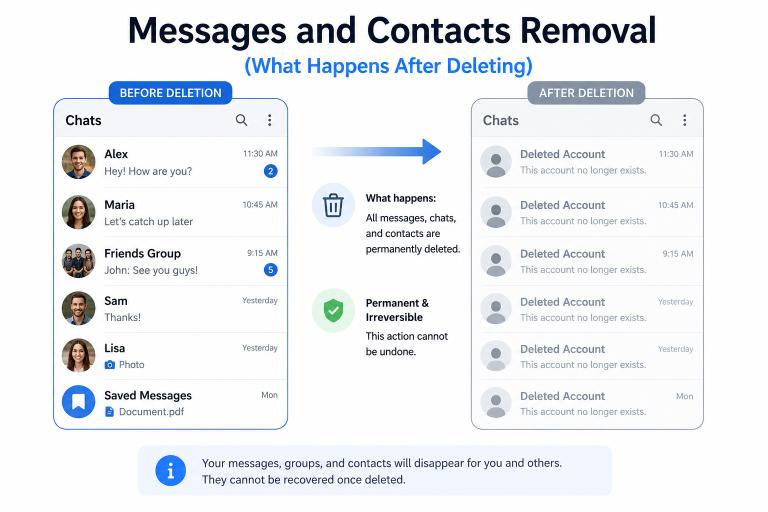
All private messages and media shared in one-on-one chats are permanently deleted from Telegram’s servers. This includes:
- Text messages, photos, videos, voice messages, and files in private conversations
- Saved Messages content stored in your personal Telegram cloud
- Your Telegram contact associations (your device’s phone contacts are not affected)
Messages you sent inside group chats will remain visible to other group members, but your name will appear as “Deleted Account” instead of your profile name.
Groups and Channel Ownership Risks
If you are the sole administrator of a Telegram channel or group, that channel becomes permanently inaccessible to all members when your account is deleted. No one will be able to post, manage, or recover it.
If you still have any access to your account before deleting, transfer ownership of your channels and groups first. Go to the group or channel settings, tap Administrators, select a trusted member, and choose Transfer Ownership.
Can the Account Be Recovered Later?
No. A deleted Telegram account cannot be recovered under any circumstances. Telegram does not retain deleted account data, and support cannot restore it. You can create a new Telegram account using the same phone number after deletion, but it will be a completely fresh account with no history.
Best Alternative If You Cannot Delete the Account Immediately
If you are completely locked out and cannot delete the account right now, take these protective steps to limit exposure until the account can be removed.
Log Out of All Sessions
If you regain any temporary access to your account, immediately go to Settings > Privacy and Security > Active Sessions and tap Terminate All Other Sessions. This logs the potential attacker out of all devices and reduces the risk of ongoing misuse while you work on deletion.
Secure the Linked Phone Number
Your phone number is the master key to your Telegram account. Contact your mobile carrier and:
- Ask them to add a PIN or passcode to your account to prevent unauthorized SIM swaps
- Verify that no unauthorized call forwarding or number porting has been set up
- Request that any recent port-out requests be flagged or reversed
Securing the phone number directly is often faster and more effective than waiting for Telegram support.
Remove Personal Information From Telegram
If you can access the account at all, clean it up before deletion or while waiting for auto-deletion:
- Go to Settings and remove your profile photo.
- Delete or change your username (tap the username field and clear it).
- Remove your bio text.
- Change your first and last name to something generic.
This limits what is publicly visible on your account while the deletion process is pending.
FAQ :
Can I delete my Telegram account without the confirmation code?
Yes, but only if you still have an active Telegram session on another device. You can receive the verification code there and delete the account through my.telegram.org/deactivate. Otherwise, you’ll need to wait for Telegram’s inactivity auto-delete feature.
Why is Telegram not sending the deletion code by SMS?
Telegram usually sends verification codes inside the Telegram app for security reasons. SMS is only used in certain situations. Check Telegram on all logged-in devices before expecting an SMS.
What if I lost access to my phone number?
If you’re still logged into Telegram on another device, you can receive the code there. Without phone number access or active sessions, the account will eventually be removed through Telegram’s inactivity auto-delete timer.
Can Telegram support delete my account for me?
No. Telegram support cannot manually delete your account or bypass the verification process. Account deletion requires identity verification through Telegram’s normal security procedures.
How long does Telegram auto-delete take?
Telegram automatically deletes inactive accounts after the period you selected: 1 month, 3 months, 6 months, or 1 year. The default setting is typically 6 months of inactivity.
Can a hacked Telegram account be deleted without verification?
Only if you regain access to an active Telegram session or recover your phone number. If a hacker controls both, your best option is to contact your mobile carrier and secure the number first.
Will uninstalling Telegram remove my account?
No. Uninstalling the app only removes it from your device. Your account, chats, contacts, and groups remain active until you permanently delete the account through the official Telegram deactivation page.
Conclusion
Not receiving the Telegram confirmation code is usually a fixable problem. First, check whether Telegram is still logged in on another phone, tablet, desktop app, or browser session. If it is, you can often receive the verification code there and complete the deletion process within minutes.
If you’ve lost access to all devices and your phone number, Telegram’s inactivity auto-delete feature becomes the most practical solution. For hacked accounts, recovering control of your phone number through your mobile carrier should be the top priority, as it restores your ability to verify ownership and manage the account.
Next step: Once you have deleted your account, read our guide on what happens after deleting Telegram to understand exactly what was removed and what comes next.
DeleteAccount.com is not affiliated with Telegram. This guide is for informational purposes only. Steps may vary slightly depending on your app version.

Alex Mu is a digital technology writer focused on Telegram, account management, online privacy, and app troubleshooting. Through clear, practical guides, Alex helps readers understand digital platforms, manage their accounts, and resolve common technical issues. His work emphasizes accurate information, simple explanations, and step-by-step solutions that readers can follow with confidence.


