Last Updated: July 2026
Quick Answer:
To hide your phone number on Telegram, open Settings > Privacy and Security > Phone Number, then set “Who can see my phone number” to Nobody. This removes your number from your profile for everyone except people who already have it saved in their phone contacts. For full privacy, also set “Who can find me by my number” to My Contacts.
Key Facts
- Setting your number to “Nobody” hides it from strangers, but not from people who already have your number saved as a contact
- Telegram lets you add specific exceptions — people who can always or never see your number, regardless of your main setting
- Your username, not your phone number, becomes how new people find and message you once your number is hidden
- Number visibility settings sync across Android, iPhone, desktop, and web — you only need to change it once
- Hiding your number does not delete it from Telegram’s servers; it’s still required to keep your account active
Why Hide Your Phone Number on Telegram?
Telegram uses your phone number to create your account, but it doesn’t have to stay visible once you’re up and running. A lot of people join groups, communities, or business chats where strangers can see their profile — and by default, that can include your real number.
Hiding it matters if you use Telegram for public channels, customer support, dating, freelancing, or any group where you don’t personally know everyone. It’s also a basic step if you’ve ever had your number pulled from another app and shared without your permission.
Step-by-Step: Hide Your Phone Number on Telegram
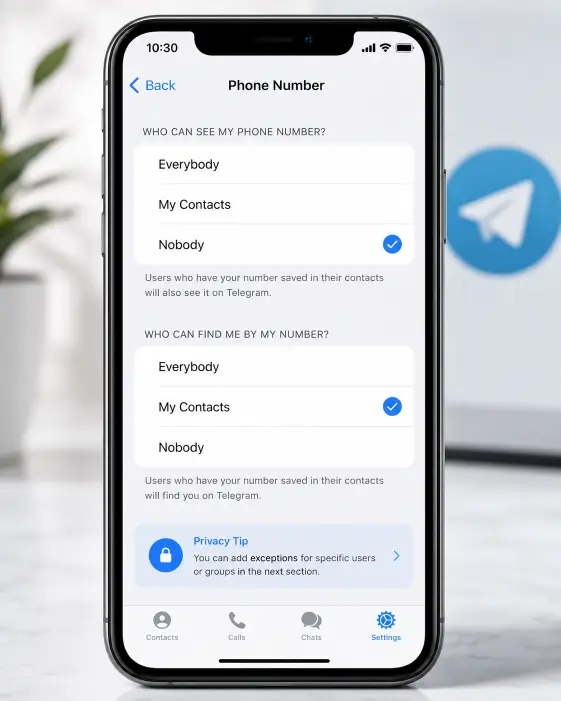
Warning: Changing this setting takes effect immediately for new contacts, but people who already have your number saved on their phone will still see it. Read the “Why People Can Still See Your Number” section below before you assume you’re fully hidden.
- Open Telegram and tap the hamburger menu (three lines) in the top-left corner, or your profile photo.
- Tap Settings.
- Tap Privacy and Security.
- Tap Phone Number.
- Under “Who can see my phone number,” select Nobody (or My Contacts if you want saved contacts to see it, but no one else).
- Under “Who can find me by my number,” select My Contacts. This stops strangers from adding you as a contact just because they typed your number in.
That’s it — no confirmation code, no waiting period. The change applies right away.
Platform Coverage
| Platform | Steps Count | Menu Path | Time Needed |
|---|---|---|---|
| Android | 5 steps | Menu > Settings > Privacy and Security > Phone Number | 1 minute |
| iPhone | 5 steps | Settings tab (bottom right) > Privacy and Security > Phone Number | 1 minute |
| Telegram Desktop | 5 steps | Settings > Privacy and Security > Phone Number | 1 minute |
| Telegram Web (web.telegram.org) | 5 steps | Menu icon > Settings > Privacy and Security > Phone Number | 1 minute |
The menu wording is identical across platforms — Telegram keeps its privacy settings consistent whether you’re on mobile, desktop, or the browser version.
Understanding the Two Separate Settings
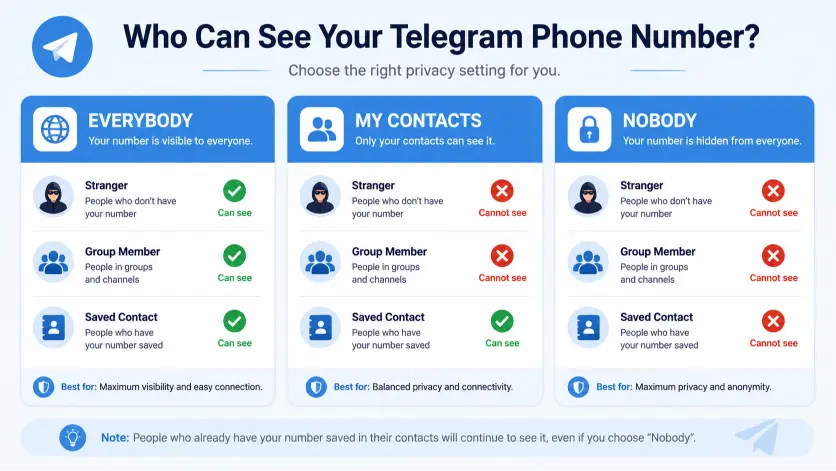
This is where most guides stop short, and it’s the part that actually determines how private you are.
“Who can see my phone number” controls whether your number shows up on your profile page to people you chat with.
“Who can find me by my number” controls whether someone who already has your number saved on their phone can find your Telegram account and add you as a contact just by having that number.
You need to adjust both. Setting only the first one still lets people locate your account using your number, even if they can’t see it displayed afterward.
See Exactly Who Can View Your Number
Who sees your number, right now?
Tap a privacy setting below and watch how it changes what a stranger, a group member, and a saved contact can actually see.
Tap a setting to see how visibility actually changes for strangers, group members, and saved contacts.
Using Exceptions for More Control
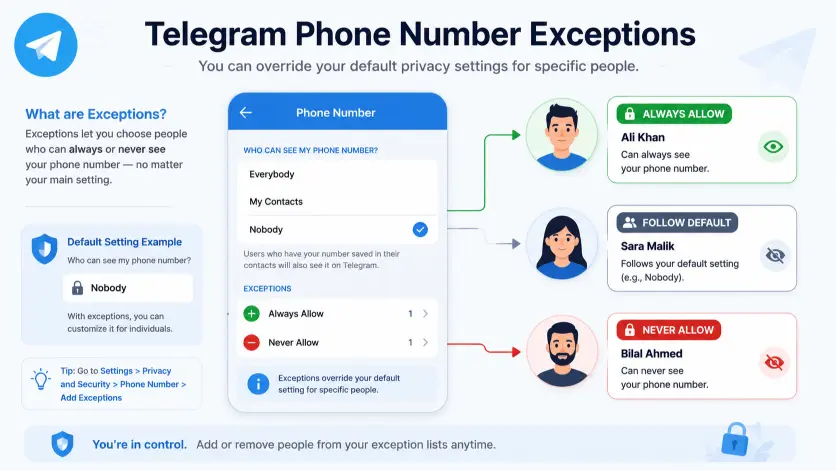
Telegram lets you fine-tune this further with an Add Exceptions option under each privacy setting. This lets you:
- Always share your number with specific people, even if your main setting is “Nobody”
- Never share your number with specific people, even if your main setting is “Everybody” or “My Contacts”
This is useful if you want your close friends to see your number by default but want to block one specific person — like an ex-coworker or someone from an old group chat — from ever seeing it, without changing your setting for everyone else.
To set an exception: go to Phone Number > Who can see my phone number > Add Exceptions, then search for and select the specific contacts.
Why People Can Still See Your Number (Common Confusion)
| Situation | Can They See Your Number? | Why |
|---|---|---|
| Stranger in a group chat | No, if set to Nobody | Group membership doesn’t override your privacy setting |
| Someone with your number already saved as a contact | Yes | Telegram matches saved contacts regardless of your privacy setting |
| Someone you message first | No | Messaging someone doesn’t reveal your number to them |
| A Telegram bot you’ve messaged | Depends on the bot | Some bots request phone number access separately via a share prompt |
| Business/verified accounts | Sometimes | Business accounts may display a public number if the owner adds one intentionally |
The most common mistake people make is assuming “Nobody” means nobody, full stop. If a person already has your digits stored in their phone’s address book and that number matches your Telegram account, Telegram will still show the match — that’s a contacts-matching feature, not a bug in the privacy setting.
What Happens After You Hide Your Number
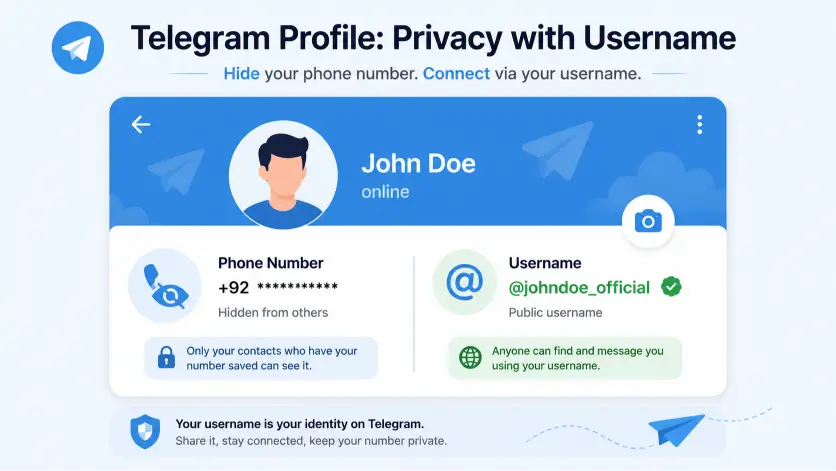
Once hidden, your username becomes your public identity. If you haven’t set one, go to Settings > Username and create one — this is what people will use to find and message you instead of your number.
Groups and channels you’re already in won’t reveal your number differently after the change; group membership was never tied to number visibility unless you’d previously set it to “Everybody.”
Troubleshooting: Setting Not Working
| Problem | Likely Cause | Fix |
|---|---|---|
| Number still visible after setting to Nobody | Person has you saved as a contact | Ask them to delete your contact card, or add them to “Never Share” exceptions |
| Setting reverts after app update | Rare app bug, usually fixed by reopening settings | Force-close and reopen Telegram, recheck the setting |
| Can’t find “Phone Number” option | Outdated app version | Update Telegram from the App Store or Google Play |
| Still getting added by strangers | “Who can find me by my number” set to Everybody | Change it to My Contacts |
Tips for Specific Situations
- Running a business account: Use a Telegram username plus a dedicated Telegram Business number instead of your personal one, so you never have to hide anything after the fact.
- Using Telegram for dating or new communities: Set both privacy fields to Nobody/My Contacts before you join any new group, not after.
- Shared or family devices: Double-check the setting after any app reinstall — a fresh install occasionally resets privacy defaults to Telegram’s out-of-the-box setting of “Everybody.”
If you’re dealing with a Telegram account that’s already been compromised rather than just a visibility concern, our guide on what to do if your Telegram account is hacked walks through recovery steps. And if you’re changing numbers entirely rather than just hiding the current one, see how to change your phone number on Telegram.
FAQ
Does hiding my phone number on Telegram delete it from Telegram’s servers?
No. Telegram still needs your number on file to keep your account active and let you log back in. Hiding it only controls who can see or search it — it doesn’t remove it from Telegram’s systems.
Can people in a group still find my number if it’s hidden?
No. Being in the same group or channel doesn’t bypass your privacy setting. Group members can only see your number if your setting allows it or if they already have it saved as a contact.
Will hiding my number stop spam messages?
It reduces the chance of strangers finding your account through your number, but it won’t stop messages from people who already have your number or who find you through a shared group or username.
Can I hide my number from everyone, including my saved contacts?
Not automatically — contact matching happens regardless of your setting. Your only workaround is asking the specific person to delete you from their phone contacts, or adding them to your “Never Share” exceptions list.
Do I need a username if I hide my phone number?
It’s strongly recommended. Without a username, new people have almost no way to find or message you once your number is hidden.
Does this setting apply the same way on Telegram Desktop and mobile?
Yes. The privacy setting is tied to your account, not your device, so it applies instantly across every version of Telegram you’re logged into.
Can Telegram Premium users hide their number differently?
No — the phone number privacy controls (Nobody, My Contacts, Everybody, and exceptions) are the same for free and Premium accounts. Premium adds other features, but not extra number-privacy options.
DeleteAccountGuide.com is not affiliated with Telegram. This guide is for informational purposes only. Steps may vary slightly depending on your app version.

Azam Malik is the founder and author of DeleteAccountGuide.com, where he creates easy-to-follow guides for deleting online accounts safely and protecting digital privacy. With experience in SEO, content strategy, and user-focused website development, he specializes in creating simple step-by-step tutorials that help users manage and remove their online accounts without confusion.


