
Last Updated: July 2026
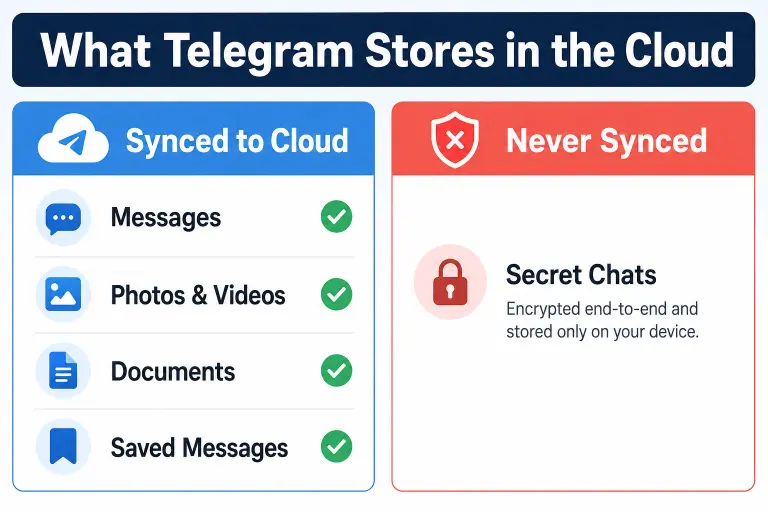
Quick Answer: Telegram stores your messages, photos, videos, documents, and Saved Messages on its own servers indefinitely, which is what lets you access the same chat history on your phone, tablet, and desktop at once. The one exception is Secret Chats — those stay only on your device and never touch Telegram’s cloud.
Key Facts
- Telegram is a cloud-first app: your regular chats, media, and files live on Telegram’s servers, not just your phone
- Secret Chats are the only exception — they’re device-only and never sync to the cloud
- Files can be up to 2 GB each on the free plan, 4 GB with Telegram Premium, with no cap on total storage
- Cloud chat data is retained indefinitely until you manually delete it — there’s no automatic expiry
- Regular cloud chats use server-side encryption, not end-to-end encryption
Telegram works differently from apps like WhatsApp or Signal because it’s built as a cloud service first and a messaging app second. That’s the whole reason you can open Telegram on a new phone and instantly see years of chat history without restoring a backup file. But it also means understanding exactly what’s being stored, where, and for how long matters more than most users realize — especially if you’ve ever used Telegram to hold onto sensitive files.
What Is Telegram Cloud Storage?
Telegram cloud storage is the system that keeps your messages, photos, videos, and documents saved on Telegram’s servers instead of only on your device. This is what makes multi-device sync possible — log into Telegram on a new phone or the desktop app, and your entire chat history is already there, no backup file required. Most messaging apps, like WhatsApp, store your media locally on your device and only back it up if you manually set that up through Google Drive or iCloud. Telegram flips that model: the cloud copy is the primary copy, and your device just displays it.
What Exactly Gets Stored Online?
Telegram stores several categories of data in the cloud:
- Messages — every text message in regular (non-Secret) chats
- Photos and videos — anything sent or received in cloud chats
- Documents and files — PDFs, zip files, and other attachments up to the size limit
- Saved Messages — your personal notes-to-self folder, which is really a private cloud chat with yourself
- Voice messages and video notes
- Group and channel content — messages and media in groups and channels you’re part of
- Contacts — your synced contact list, if you’ve allowed contact syncing
Group messages are cloud-stored the same way personal chats are, which is what allows every member to see full message history when they join or reopen the app on a new device. Channels work the same way on the storage side — posts and media sit on Telegram’s servers so subscribers can scroll back through old content at any time.
What Is NOT Stored in the Cloud?
Secret Chats are the only type of conversation that stays off Telegram’s servers. They’re encrypted end-to-end and exist only on the two devices involved in that conversation. This has real practical consequences:
- Secret Chats don’t appear in your Saved Messages
- They don’t sync across your other devices — starting one on your phone means it won’t show up on your desktop app
- If you lose or reset the device you started a Secret Chat on, that conversation is gone
- Screenshots inside Secret Chats can trigger a notification to the other person, unlike regular chats
How Does Syncing Actually Work?
When you send a message in a regular chat, it’s written to Telegram’s servers first. Then it’s pushed out to every device where you’re logged in. That’s why opening Telegram on a new laptop shows your full chat history instantly. You’re not downloading a backup. You’re just viewing the same server-side copy your phone already reads from. This also explains why deleting a message “for everyone” removes it from the server entirely. It gets wiped from every device at once. Deleting it “for me” only hides your local view.
Where Are Files Physically Stored?
Telegram stores files on its own content delivery network (CDN), spread across data centers in multiple countries. You don’t choose which server your data lives on — Telegram’s infrastructure handles that automatically, and it’s not something you can configure or view from the app. This differs from services like Dropbox or Google Drive, which sometimes let business users pick a storage region for compliance reasons.
How Long Does Telegram Keep Cloud Data?
There’s no automatic expiry for your cloud chat data. Messages, files, and Saved Messages remain on Telegram’s servers indefinitely until you manually delete them. This is different from apps that auto-delete old media to save space — Telegram keeps everything unless you take action.
If you want files or messages to disappear automatically, you have to set that up yourself using self-destruct timers in Secret Chats, or Telegram’s auto-delete timer feature available in regular chats under chat settings.
⚠️ Warning: Because cloud data doesn’t expire on its own, anything sensitive you’ve forwarded to Saved Messages — passwords, ID photos, verification codes — stays on Telegram’s servers indefinitely unless you go delete it yourself.
Is Telegram Cloud Storage Encrypted?
Regular cloud chats use Telegram’s own MTProto protocol, which encrypts data between your device and Telegram’s servers. That’s different from end-to-end encryption, since Telegram’s servers can theoretically access the content because they hold the encryption keys. Only Secret Chats offer true end-to-end encryption, where even Telegram cannot read the messages.
This distinction matters most if you’re deciding where to put sensitive material. Cloud chats are convenient and searchable across devices, but they’re not the private option. Secret Chats are private but inconvenient for anything you want to reference later from a different device.
Cloud Storage vs. Secret Chats: Quick Comparison
| Feature | Regular Cloud Chats | Secret Chats |
|---|---|---|
| Stored on Telegram’s servers | Yes | No |
| Syncs across devices | Yes | No |
| End-to-end encrypted | No | Yes |
| Appears in Saved Messages | Yes | No |
| Self-destruct timers | Optional auto-delete | Built-in |
| Survives app reinstall | Yes | No |
| Searchable across chats | Yes | No |
Can You Use Telegram as a Free Cloud Storage Service?
Many people use their own Saved Messages chat as an informal cloud drive, sending files to themselves to access from any device. It works, and there’s no storage cap beyond the per-file limit. But it’s worth being clear-eyed about the tradeoff: you’re storing that data on Telegram’s servers under Telegram’s encryption keys, not your own. For casual files — notes, screenshots, non-sensitive documents — that’s generally fine. For anything genuinely sensitive, it’s not the right tool.
If you’re curious how much space your account is actually using across chats and media, our Telegram data size estimator gives you a quick way to check before you assume Telegram’s cloud is a free unlimited backup.
Managing Your Cloud Storage Usage
Telegram doesn’t show a single storage dashboard the way Google Drive does, but you can manage usage manually:
- Go to Settings → Data and Storage
- Tap Storage Usage to see space used by chat, photos, videos, and files
- Clear cache for specific chats or media types you no longer need locally
- Use Settings → Data and Storage → Auto-Download Media to stop automatically downloading large files you don’t need saved to your device
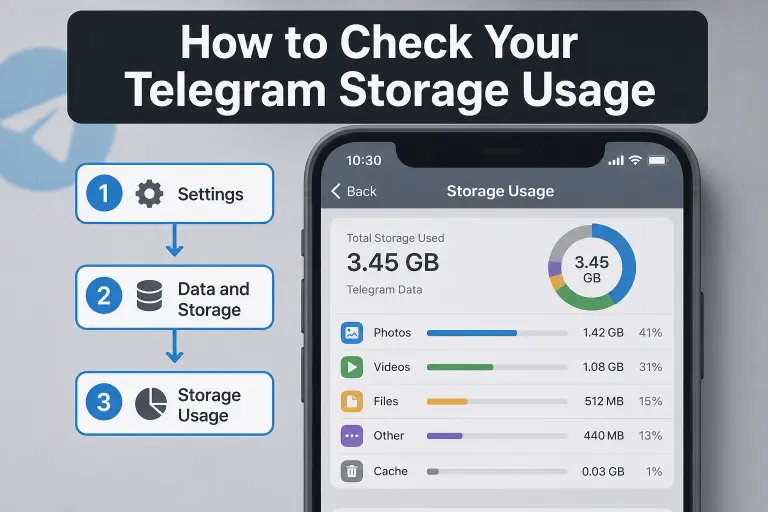
Note that clearing local cache only frees up space on your device — it does not delete anything from Telegram’s cloud servers. Your files remain accessible from other devices even after you clear cache on one.
Common Mistakes to Avoid
Secret Chats don’t back up the same way regular chats do. Losing the device you started one on means losing the conversation entirely. Nothing syncs to the cloud. Saved Messages also shouldn’t be treated as a secure vault. This includes sensitive documents like ID scans or 2FA backup codes. That data sits under Telegram’s encryption keys, not yours. Clearing your local cache and deleting cloud data are two entirely different actions. Freeing up space on your phone won’t remove anything from Telegram’s servers. It’s worth remembering that “cloud storage” doesn’t mean automatic deletion. Nothing disappears unless you set a timer or delete it yourself. Don’t confuse “cloud storage” with automatic deletion. Nothing disappears from Telegram’s servers unless you set a timer or delete it manually.
What Happens to Cloud Data If You Delete Your Account?
Deleting your Telegram account removes your cloud-stored messages, media, and Saved Messages from Telegram’s servers, along with your account itself. If you’re weighing that step, our guide on what happens when you delete your Telegram account walks through exactly what’s erased and what other people in shared chats will still see.
If instead your chats seem to be missing or not updating across devices, that’s usually a sync issue rather than a storage one — our Telegram sync problems guide covers the common fixes.
FAQ
Does Telegram delete old messages automatically?
No. Telegram keeps cloud chat messages indefinitely unless you manually delete them or set an auto-delete timer in a specific chat.
Can Telegram read my regular cloud chats?
Technically, yes. Regular cloud chats use server-side encryption where Telegram holds the keys, meaning the content isn’t end-to-end encrypted the way Secret Chats are.
Do Secret Chats back up to the cloud?
No. Secret Chats are device-only, don’t sync across your other devices, and are lost if you lose or reset the device they were created on.
Is there a limit to how much I can store on Telegram?
There’s no total storage cap, but individual files are limited to 2 GB on the free plan and 4 GB with Telegram Premium.
Are Saved Messages private from other Telegram users?
Yes, Saved Messages is a private chat only you can see. However, it’s still cloud-stored under Telegram’s encryption, not end-to-end encrypted.
What happens to group chat data if I leave a group?
The group’s messages and media remain on Telegram’s servers for other members. Leaving only removes the group from your own chat list and access.
Does clearing my cache delete files from Telegram’s servers?
No. Clearing cache only removes locally downloaded copies from your device. The files remain stored on Telegram’s servers and accessible from your other devices.
DeleteAccountGuide.com is not affiliated with Telegram. This guide is for informational purposes only. Steps may vary slightly depending on your app version.

Alex Mu is a digital technology writer focused on Telegram, account management, online privacy, and app troubleshooting. Through clear, practical guides, Alex helps readers understand digital platforms, manage their accounts, and resolve common technical issues. His work emphasizes accurate information, simple explanations, and step-by-step solutions that readers can follow with confidence.


