Last Updated: May 2026
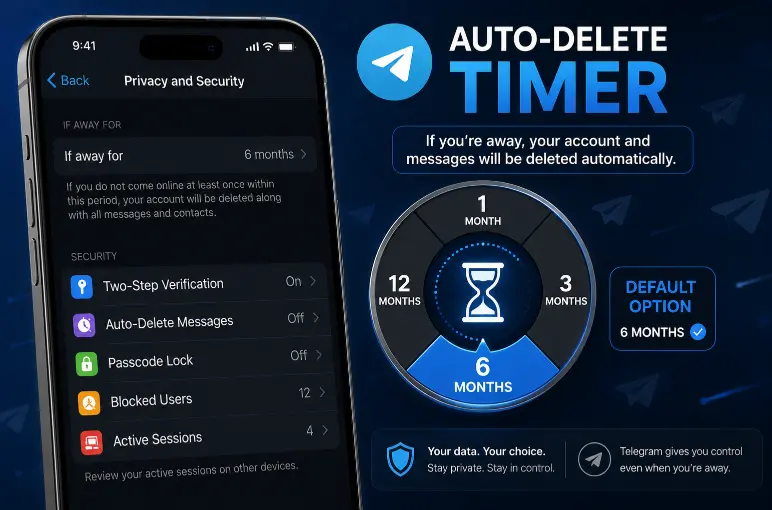
Quick Answer: Telegram’s Auto-Delete feature, found under Settings → Privacy and Security → If Away For, automatically deletes your account after a set period of inactivity — 1 month, 3 months, 6 months, or 12 months. The timer resets every time you actively use the app, and once it expires, the deletion is just as permanent as manually deleting your account.
Key Facts
- Auto-Delete is based on inactivity, not on uninstalling the app or simply not opening it for a few days
- Available timer options are 1 month, 3 months, 6 months, and 12 months, with 6 months as the default
- Opening the app and using it normally resets the timer — you do not need to do anything special to stay active
- Telegram does not send a final warning immediately before the automatic deletion happens
- Deletion through this feature is permanent — exactly the same as deleting your account manually
Not everyone who searches for Telegram account deletion wants to delete their account right now. Some people just want peace of mind — a safety net that automatically removes their account if they ever stop using Telegram and forget to close things out properly. Maybe you are stepping away for a while, switching apps but not 100% sure yet, or just want a privacy backstop in case something happens to you.
Telegram actually has a built-in feature for exactly this situation. It is called the Auto-Delete or self-destruct account setting, and it lives quietly inside your privacy settings, waiting to do its job if you ever go inactive for too long.
This guide explains exactly how this feature works, how to set it up on every device, what counts as activity, and exactly what happens when the timer finally runs out. This is not a guide about deleting your account right now — it is about understanding and configuring the inactivity timer Telegram already built for you.
What Is Telegram’s Auto-Delete Feature?
Telegram’s Auto-Delete feature is a built-in setting that automatically and permanently deletes your account after a chosen period of inactivity. You set the timer once, and Telegram handles the rest in the background — no further action needed unless you want to change the setting later.
Auto-Delete vs Immediate Account Deletion
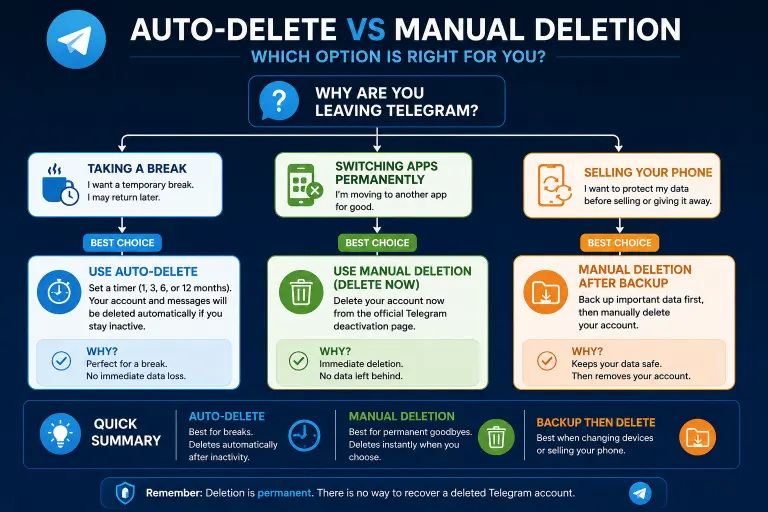
These are two completely different processes, and confusing them leads to a lot of unnecessary worry. Immediate account deletion happens the moment you confirm it through Telegram’s official deactivation page — it is instant and intentional. Auto-Delete, on the other hand, is a passive setting that only triggers after a long stretch of inactivity that you define in advance. Setting an Auto-Delete timer does not delete your account today, tomorrow, or any time soon unless you genuinely stop using Telegram for the full duration you selected.
Why Telegram Includes This Feature
Telegram built this feature for a few practical reasons. It gives privacy-conscious users a safety net in case they lose access to their device, become unable to manage their account, or simply walk away from the platform without formally deleting it. It also helps Telegram clean up genuinely abandoned accounts over time, reducing the number of dormant profiles sitting on their servers indefinitely. For everyday users, it is essentially an automatic failsafe — set it once and stop worrying about it.
How to Set Up Telegram Account Auto-Delete
The setting lives in the same place across most Telegram apps, though the exact navigation differs slightly by platform.
On Android
- Open Telegram on your Android device
- Tap the three-line menu in the top left corner
- Tap Settings
- Tap Privacy and Security
- Scroll down to If Away For
- Select your preferred inactivity period
The setting takes effect immediately once selected, and you can return to change it at any time.
On iPhone
- Open Telegram on your iPhone
- Tap Settings in the bottom right corner
- Tap Privacy and Security
- Scroll down to If Away For
- Select your preferred inactivity period
iOS and Android use the same underlying setting — only the navigation path through the app’s menu layout looks slightly different.
On Telegram Desktop
Telegram Desktop primarily mirrors your account settings rather than offering a fully separate management screen for this specific option. The most reliable way to view or change your Auto-Delete timer is through the mobile app, where the Privacy and Security menu includes the full If Away For setting. If you only use Telegram Desktop, log in through a mobile device at least once to configure or verify this setting directly.
What Time Options Can You Choose?
Telegram offers four inactivity periods to choose from, each suited to a different type of user.
| Inactivity Period | Best For | When Deletion Happens |
|---|---|---|
| 1 Month | Maximum privacy | After 30 days of inactivity |
| 3 Months | Moderate users | After 90 days |
| 6 Months | Default setting | After 180 days |
| 12 Months | Occasional users | After one year |
The 6-month option is Telegram’s default setting for accounts that have never had this preference changed. If you want maximum privacy and are comfortable with your account disappearing quickly if you stop logging in, the 1-month option offers the tightest safety net. If you use Telegram only occasionally — checking in every few months rather than daily — the 12-month option gives you the most breathing room without risking accidental deletion.
Available options may vary slightly depending on your app version, so always check the current selections shown in your own Settings menu before assuming the list above is exhaustive.
What Counts as “Activity” on Telegram?
This is one of the most common points of confusion, and getting it wrong can lead to either unnecessary panic or, worse, an accidental deletion you did not expect.
Opening the Telegram App
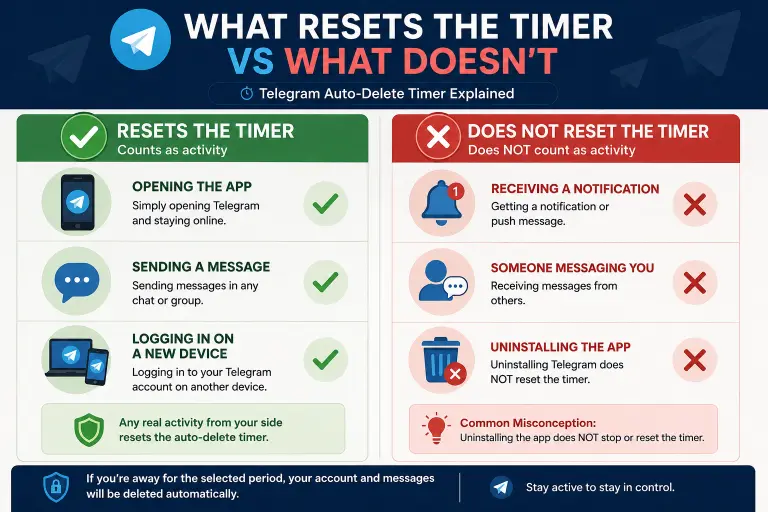
Simply opening the app while logged in counts as activity and resets your inactivity timer. You do not need to send a message or do anything elaborate — just launching the app and having it load your account is enough to reset the countdown.
Sending Messages
Sending messages, joining groups, reacting to content, or doing anything that requires an active connection to Telegram’s servers absolutely counts as activity. Any genuine interaction with your account resets the timer back to zero.
Receiving Notifications
Receiving a notification does not count as activity on your part. Someone messaging you, a group mentioning you, or a channel posting new content does not reset your personal inactivity timer — only actions you take yourself count toward keeping your account active.
Logging In on Another Device
Logging into Telegram on a new device — a tablet, a second phone, a computer — counts as activity and resets the timer. This means if you regularly switch devices or add new sessions, your account stays well within the active window even if you are not using your primary device often.
What Happens When the Auto-Delete Timer Expires?
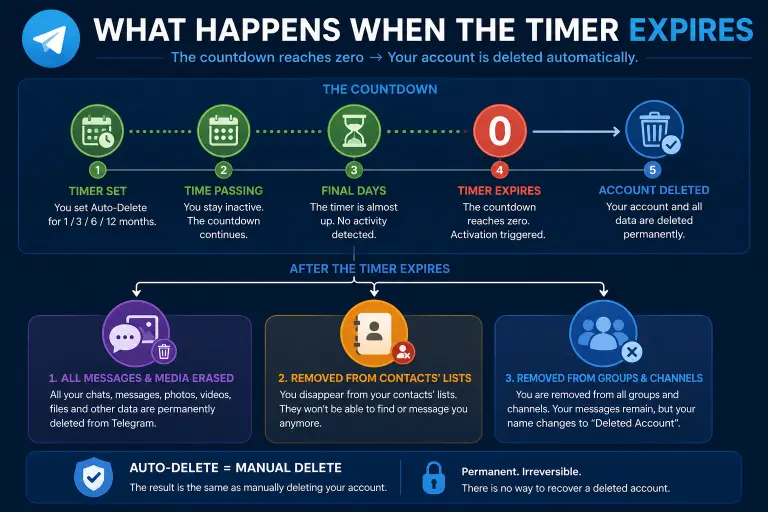
If the selected inactivity period passes without any qualifying activity, Telegram proceeds with permanent automatic deletion — and the consequences mirror exactly what happens during manual deletion.
Messages and Media
All your messages, media, and cloud-stored content are permanently removed from Telegram’s servers the moment the auto-delete process completes. There is no partial deletion or grace period once the timer actually expires — the removal is complete and immediate at that point.
Contacts and Profile
Your profile disappears from everyone who had you saved as a contact, exactly as it would with manual deletion. Your name, photo, and username are removed, and your former contacts will see your account listed as deleted in any shared chat history.
Groups and Channels
You are removed from every group and channel you belonged to. If you owned any channel or group without a transferred admin, that community may become permanently inaccessible once the automatic deletion completes — the same risk that applies to manual deletion applies here as well.
Can the Account Be Recovered?
No. Automatic deletion through the inactivity timer is exactly as permanent as deleting your account manually through the official page. There is no special recovery process for accounts removed this way. Once the timer expires and Telegram processes the deletion, the account and all its data are gone for good.
How to Change or Turn Off the Auto-Delete Timer
You are not locked into your original selection — the timer setting can be adjusted at any point before it expires.
Changing to a longer period simply requires returning to Settings → Privacy and Security → If Away For and selecting a longer timeframe. This immediately extends your safety window.
Switching to a shorter period works the same way — select a shorter timeframe if you want a tighter inactivity window going forward.
Disabling the feature entirely is not directly available as an “off” option in most current versions — the shortest path to minimizing risk if you do not want any auto-deletion is to keep the timer set to the longest available option, 12 months, and simply remain reasonably active.
Resetting through normal account activity is the simplest way to manage this long-term. Since opening the app, sending messages, or logging into a new device all reset the countdown, regular everyday use of Telegram keeps the timer from ever becoming a concern in the first place.
Common Misunderstandings About Telegram Auto-Delete
A handful of common misconceptions cause unnecessary confusion about Telegram’s Auto-Delete Account feature. Understanding how it really works can help you avoid accidentally losing access to your account.
Uninstalling Telegram Does Not Start Auto-Delete
Removing the Telegram app from your phone does not trigger account deletion or affect the inactivity timer. Your account remains on Telegram’s servers, and the countdown is based on your last activity—not whether the app is installed on your device.
Logging Out Does Not Delete Your Account
Logging out only ends your current session on that device. Your Telegram account stays active, and the Auto-Delete countdown continues according to your inactivity period. You can sign back in at any time without resetting or triggering immediate deletion.
Choosing an Auto-Delete Period Does Not Erase Your Account Immediately
Selecting a 3-month, 6-month, or longer inactivity period does not delete your account right away. It simply tells Telegram how long to wait after your last activity before permanently removing the account.
Any Activity Resets the Inactivity Timer
This is one of the most important things to remember. Every time you actively use Telegram—such as opening the app, sending a message, or interacting with your account—the inactivity timer resets. As long as you continue using Telegram periodically, your account will not be automatically deleted.
Telegram Does Not Guarantee a Final Warning Before Deletion
Many users expect Telegram to send a final reminder before their account is permanently deleted. However, there is no guaranteed last-minute notification. If you plan to keep your account, it’s your responsibility to stay active or adjust the Auto-Delete setting before the inactivity period expires.
Should You Use Auto-Delete or Delete Your Account Now?
Depending on your specific situation, one of these two approaches makes more sense than the other.
| Situation | Better Choice |
|---|---|
| Taking a short break | Auto-Delete |
| Unsure about leaving Telegram | Auto-Delete |
| Switching to another app permanently | Manual deletion |
| Privacy concerns | Depends on urgency |
| Selling your phone | Manual deletion after backup |
If you are simply unsure whether you want to leave Telegram for good, Auto-Delete is the safer middle ground — it gives you an exit path without forcing an irreversible decision today. If you have already fully committed to switching platforms and know you will not be coming back, manual deletion through the official process accomplishes your goal immediately rather than waiting months for the timer to run out.
For privacy concerns specifically, the right choice depends on urgency. For privacy concerns specifically, the right choice depends on urgency. General account hygiene over time is exactly what Auto-Delete handles well. An immediate privacy issue calls for manual deletion instead, since you need your data removed from Telegram’s servers right now rather than months from now.
Selling or giving away your phone changes the calculation entirely — manual deletion after backing up anything important is the safer route here. Waiting for an inactivity timer is not a substitute for actively removing your account before your device changes hands.
Frequently Asked Questions
How do I enable Telegram’s Auto-Delete feature?
Open Settings → Privacy and Security → If Away For and choose your preferred inactivity period. Telegram will automatically delete your account if you do not use it during that time.
What is the default Telegram Auto-Delete period?
For most users, Telegram sets the inactivity timer to 6 months by default. However, this may vary depending on your app version and account settings, so it is worth checking your own setting directly.
Does opening Telegram reset the Auto-Delete timer?
Yes. Simply using your Telegram account normally, including opening the app while logged in, resets the inactivity timer and prevents automatic deletion from moving any closer to triggering.
Will Telegram notify me before automatically deleting my account?
Telegram generally does not send a final warning immediately before your account is deleted. It is your responsibility to keep your account active if you want to prevent deletion from this feature.
Can I recover my account after Auto-Delete removes it?
No. Once the inactivity timer deletes your account, the deletion is permanent. You can create a new account using the same phone number, but your previous chats and data cannot be restored.
Does uninstalling Telegram activate Auto-Delete?
No. Uninstalling the app does not start the deletion process by itself. The timer is based on account inactivity, not whether the app is installed on any particular device.
Can I change the Auto-Delete timer later?
Yes. You can return to Privacy and Security → If Away For at any time and select a different inactivity period before the current timer expires.
Conclusion
Telegram’s Auto-Delete feature gives you a built-in safety net without requiring you to make a final decision about your account today. Whether you are taking a break, feeling unsure about your long-term plans with the app, or simply want a privacy backstop in place, setting your preferred inactivity period under Settings → Privacy and Security → If Away For takes less than a minute and runs quietly in the background from that point forward.
Remember that ordinary use resets the timer automatically, the deletion that eventually happens is just as permanent as manual deletion, and Telegram will not send a dramatic final warning before it occurs. If your situation calls for something more immediate or definitive, manual deletion through the official process remains the better choice.
DeleteAccount.com is not affiliated with Telegram. This guide is for informational purposes only. Steps may vary slightly depending on your app version.

Alex Mu is a digital technology writer focused on Telegram, account management, online privacy, and app troubleshooting. Through clear, practical guides, Alex helps readers understand digital platforms, manage their accounts, and resolve common technical issues. His work emphasizes accurate information, simple explanations, and step-by-step solutions that readers can follow with confidence.


