Quick Answer:
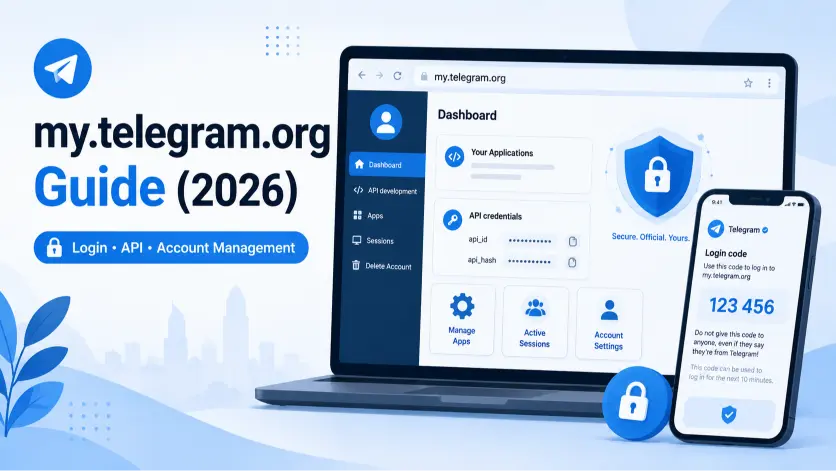
my.telegram.org is Telegram’s official developer and account-management portal — separate from web.telegram.org, which is for chatting. To log in, go to my.telegram.org, enter your phone number in international format, and enter the code Telegram sends inside your Telegram app (not by SMS). Once logged in, you can generate API credentials as a developer, review your active sessions, or permanently delete your Telegram account.
Key Facts
| Fact | Detail |
|---|---|
| What it’s for | Managing Telegram API apps (api_id/api_hash) and deleting your account |
| Login code delivery | Sent inside the Telegram app itself, not SMS |
| Common confusion | Often mixed up with web.telegram.org (the chat interface) — they’re different tools |
| Account deletion shortcut | my.telegram.org/auth?to=delete |
| Requires | An active phone number already registered with Telegram |
| Two-step verification | If enabled, you’ll need your password after the code |
| Works on mobile browsers | Yes — no desktop required |
What Is my.telegram.org, Exactly?
my.telegram.org is Telegram’s own web portal for jobs that fall outside normal messaging entirely. It exists for two main purposes:
- App development access. If you’re building something that uses the Telegram API — a bot, a script, a custom integration, a scraping tool — this is where you register your application and receive your api_id and api_hash, the credentials that let your code talk to Telegram’s servers.
- Account-level actions. This includes permanently deleting your account and, depending on your account state, reviewing recent authorization activity tied to your number.
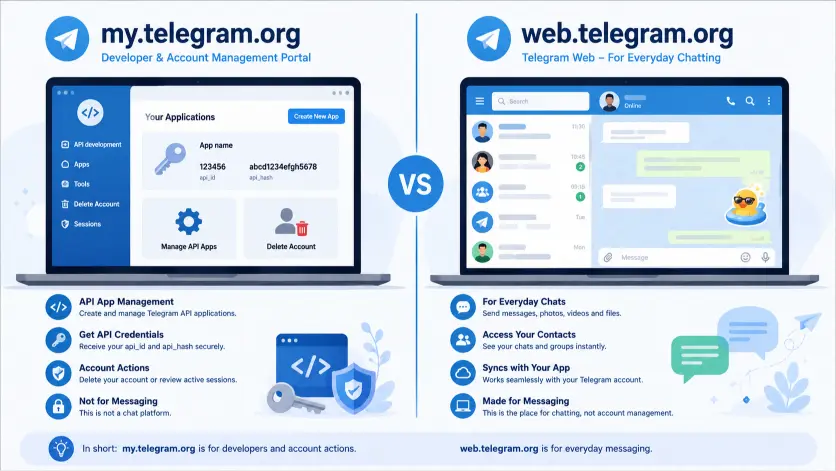
It is not the same site as web.telegram.org, which is Telegram’s browser-based chat client for reading and sending messages day to day. This mix-up is extremely common — search data consistently shows people typing “my telegram org,” “mytelegramorg,” and similar variations while actually trying to reach their chats. If that’s you, you want web.telegram.org instead. If you’re here to manage a developer app or delete your account, you’re in the right place.
Telegram intentionally keeps this portal separate from the main app. Regular users almost never need to visit it — which is part of why the login flow feels unfamiliar even to people who’ve used Telegram for years.
How Do I Log Into my.telegram.org? (Step-by-Step)
- Open a browser (mobile or desktop both work) and go to my.telegram.org
- Enter your phone number in full international format, including the country code — for example +1 for the US or +92 for Pakistan
- Click Next
- Open the Telegram app on a device where you’re already logged in — a login code arrives as a message inside Telegram, not as a text message
- Type that code into the my.telegram.org login screen
- If you have two-step verification enabled, enter your password when prompted
- You’ll land on the portal’s main screen, where you can manage API apps, or, if you arrived via the deletion link, go straight to the account deletion screen

⚠️ Common mistake: People wait for an SMS text message and never see the code, because it’s delivered through Telegram itself, not your carrier. If you don’t have the app installed anywhere or aren’t logged in on any device, you’ll need to complete a normal Telegram login first using SMS or a phone call verification before this portal will work.
Why Am I Not Getting the Login Code?
Work through these in order if the code isn’t showing up:
- Check the Telegram app directly, not your text messages. The code arrives as a message from an account labeled “Telegram,” usually pinned near the top of your chat list.
- Confirm the phone number is in full international format. A missing or incorrect country code is the single most common reason this step fails silently.
- Make sure you’re logged into Telegram on at least one device. If you’re logged out everywhere, there’s nowhere for the code to arrive. Log back into the main Telegram app first using SMS or voice call verification, then return to my.telegram.org.
- Wait roughly 60 seconds before requesting a resend. Telegram can delay delivery briefly under load, and repeatedly tapping resend sometimes pushes the code further back in the queue rather than speeding it up.
- Double-check the domain in your address bar. The only official address is my.telegram.org. No lookalike domain, however convincing, should ever receive your login code — Telegram will never ask for it anywhere else.
- Try a different network if it still fails. Some corporate or public Wi-Fi networks block Telegram’s servers, which can prevent the code from reaching the app at all. Switching to mobile data often resolves this instantly.

Can I Log In With a QR Code Instead?
Yes, in most cases. On the my.telegram.org login screen, look for a QR code option alongside the phone number field. Open Telegram on your phone, go to Settings → Devices → Link Desktop Device (the same feature used for Telegram Desktop), and scan the code shown in your browser. This skips typing your number and code manually and works well if you’re already signed into Telegram on your phone.
Can I Use my.telegram.org to Delete My Account?
Yes — alongside app development, this is the other main reason people land on this portal. Once you’re logged in via my.telegram.org/auth?to=delete, you’re taken straight to the account deletion screen instead of the developer dashboard, and the process is immediate and permanent in most cases.
Deletion involves a few things worth getting right before you confirm — backing up chats, transferring group ownership, understanding what stays visible in other people’s chat histories. Our dedicated step-by-step guide to deleting your Telegram account via my.telegram.org walks through the entire process in full. If you’re still deciding whether deletion is the right move at all, our quick quiz can help you figure that out first.
What Are api_id and api_hash, and Do I Need Them?
If you’re not building a bot, script, or third-party Telegram tool, you can skip this section entirely — it has nothing to do with regular messaging, privacy settings, or account deletion. If you are a developer, my.telegram.org is where you register an “app” to receive:
- api_id — a numeric identifier tied to your registered application
- api_hash — a secret key paired with your api_id, used to authenticate requests to Telegram’s API
Treat both like a password. Anyone who obtains your api_hash could potentially make API requests under your account’s permissions. Never paste these into a public code repository, share them in a script you distribute, or enter them into a site you don’t fully trust — including tools that ask you to “verify” your Telegram account by supplying them.
my.telegram.org vs. web.telegram.org: What’s the Difference?
| my.telegram.org | web.telegram.org | |
|---|---|---|
| Purpose | API app management, account deletion | Everyday chatting in a browser |
| Who it’s for | Developers, people deleting their account | Anyone who wants to message from a browser |
| Shows your chats? | No | Yes |
| Login code method | Sent inside the Telegram app | Sent inside the Telegram app (SMS possible on first-ever login) |
| Can you delete your account here? | Yes | No |
| Typical visit frequency | Rare — usually a one-time task | Daily, for active browser users |
Is It Safe to Log Into my.telegram.org?
Yes, provided you’re on the official domain. The portal uses the same underlying login system as the main Telegram app — your phone number and a one-time code — so the trust level is identical to logging into Telegram itself. The main risk isn’t the portal; it’s phishing sites designed to look like it. Before entering your phone number anywhere, check the address bar reads exactly my.telegram.org, with no extra words, hyphens, or unusual domain endings tacked on.
If you’ve ever received a message claiming to be “Telegram Support” asking you to verify your account through a link, that’s not this portal, and you should not enter your login code there. Telegram never initiates contact asking you to confirm your account through a third-party link.
What Happens After You Log In?
Once you’re authenticated, what you see depends on how you arrived:
- Arrived via the standard my.telegram.org address: you’ll land on the API development dashboard, where you can create a new application or view apps you’ve already registered.
- Arrived via the /auth?to=delete link: you’ll go straight to the account deletion confirmation screen instead.
- Session behavior: logging into my.telegram.org does not log you out of your regular Telegram app or affect your chats on any device — unless you specifically proceed to delete your account.
Common Mistakes to Avoid
Don’t confuse this portal with the regular Telegram web chat client — they serve completely different purposes, and typing your credentials into the wrong one out of habit just wastes time without getting you to your messages. Not wait for a text message; the login code lives inside the Telegram app itself, not your SMS inbox. Don’t share your api_id or api_hash publicly if you’re a developer — treat them the same way you’d treat a password. And don’t click login links sent to you by someone else claiming to be Telegram support; always type my.telegram.org into your browser directly instead.
FAQ
Is my.telegram.org the official Telegram site?
Yes. It’s operated directly by Telegram and is the only legitimate portal for these functions. Never enter your login code on a lookalike domain.
Why didn’t I get a text message with my code?
Telegram sends the my.telegram.org login code inside the Telegram app itself, not via SMS. Open the app on a device where you’re already logged in to find it.
Can I use my.telegram.org from my phone’s browser?
Yes. The site works on mobile browsers as well as desktop — you don’t need a computer to log in, register an app, or delete your account.
Does logging into my.telegram.org affect my regular Telegram app?
No. Logging in here doesn’t log you out of the main app or change your chats, unless you specifically go on to delete your account.
What happens if I forget my two-step verification password on my.telegram.org?
You’ll need a recovery email set up in advance to reset it. Without one, Telegram cannot restore access to a forgotten two-step password. Our two-step verification guide covers how to set one up before you’re in this situation.
Is it safe to enter my phone number on my.telegram.org?
Yes, as long as you’re on the official my.telegram.org domain. It’s the same trust level as logging into the Telegram app itself.
Can I log in on more than one device at a time?
Yes. Logging into my.telegram.org on a new device or browser doesn’t remove access anywhere else. If you want to review or remove other logged-in sessions, see our guide to managing Telegram active sessions — that’s handled from within the Telegram app rather than this portal.
Does my.telegram.org work the same way in every country?
Yes, the portal itself is identical everywhere. The only thing that varies is your phone number format — always include your country’s calling code.
Next step: If you came here to delete your account, read our full Telegram Account Deletion Checklist before you confirm — it walks through backups, group ownership transfer, and what you can’t undo. If you’re still weighing whether deletion is the right call, our quick quiz can help you decide.

Alex Mu is a digital technology writer focused on Telegram, account management, online privacy, and app troubleshooting. Through clear, practical guides, Alex helps readers understand digital platforms, manage their accounts, and resolve common technical issues. His work emphasizes accurate information, simple explanations, and step-by-step solutions that readers can follow with confidence.


