
Last Updated: July 2026
Quick Answer
To hide your phone number on Telegram, go to Settings → Privacy and Security → Phone Number, and set “Who can see my phone number?” to Nobody. You also need to set “Who can find me by my number?” to My Contacts or Nobody — hiding the number alone doesn’t stop people who already have it from finding your account.
Key Facts
- Hiding your number is done through two separate settings, not one — most guides only mention the first and miss the second.
- Setting visibility to Nobody hides your number from everyone, including people in your contacts.
- Telegram still uses your phone number to identify your account internally — hiding it only affects what other users can see, not how Telegram itself works.
- A public username lets people message you without ever needing your number.
- Contact syncing can quietly undo your privacy settings if you don’t turn it off separately.
Why Hide Your Phone Number on Telegram?
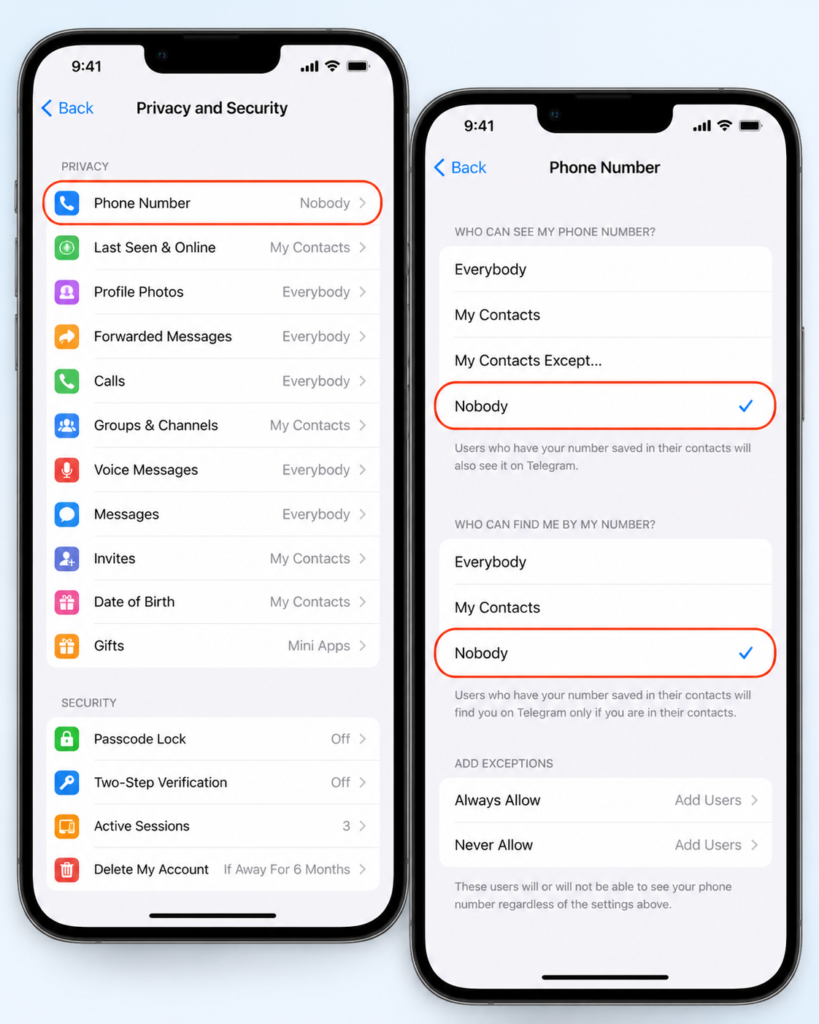
Telegram requires a phone number to create an account, but it doesn’t require you to share that number with everyone you talk to. A lot of users don’t realize their number is visible by default to anyone who adds them as a contact or finds them by number — until a stranger in a group chat, a business contact, or someone from an old contact list suddenly has it.
Hiding your number is different from going fully anonymous. It stops people from seeing or discovering your number through Telegram, but it doesn’t disconnect the number from your account entirely — Telegram still uses it behind the scenes for login and account recovery.
Step 1: Hide Your Phone Number From Your Profile
- Open Telegram and tap the menu icon (Android) or the Settings gear (iPhone).
- Tap Settings.
- Tap Privacy and Security.
- Tap Phone Number.
- Under “Who can see my phone number?”, select Nobody.
This removes your number from your visible profile. Anyone viewing your profile — including people already in your contacts — will no longer see it displayed.
Step 2: Stop People From Finding You by Number
This is the step most guides skip, and it’s the one that actually matters. Even with your number hidden from your profile, anyone who has your number saved in their phone can still find your Telegram account by searching it — unless you close that door separately.
- Stay on the same Phone Number settings screen.
- Under “Who can find me by my number?”, select My Contacts or Nobody.
- Choosing My Contacts means only people already saved in your phone’s contacts (and who also have your number) can find you this way.
- Choosing Nobody blocks discovery by number entirely, even for people who already have it saved.
Without this second setting, “hiding” your number is mostly cosmetic — the number is invisible on your profile, but strangers can still type it into Telegram’s search and land on your account.
Step 3: Turn Off and Clear Contact Syncing
Telegram periodically uploads your phone’s contact list to match you with people you know. If you leave this on, it can undermine the privacy settings you just changed, and it also means your own number stays associated with contact data on Telegram’s servers.
- Go to Settings → Privacy and Security → Data Settings.
- Toggle off Sync Contacts.
- Tap Delete Synced Contacts to remove any contact data Telegram has already stored from your device.
This step doesn’t hide your number from other users directly, but it reduces how much of your personal network is tied to your account on Telegram’s end.
Step 4: Set Up a Username So People Can Still Reach You
Once your number is hidden, people can’t add or message you by number anymore — which means you need another way for people to find you.
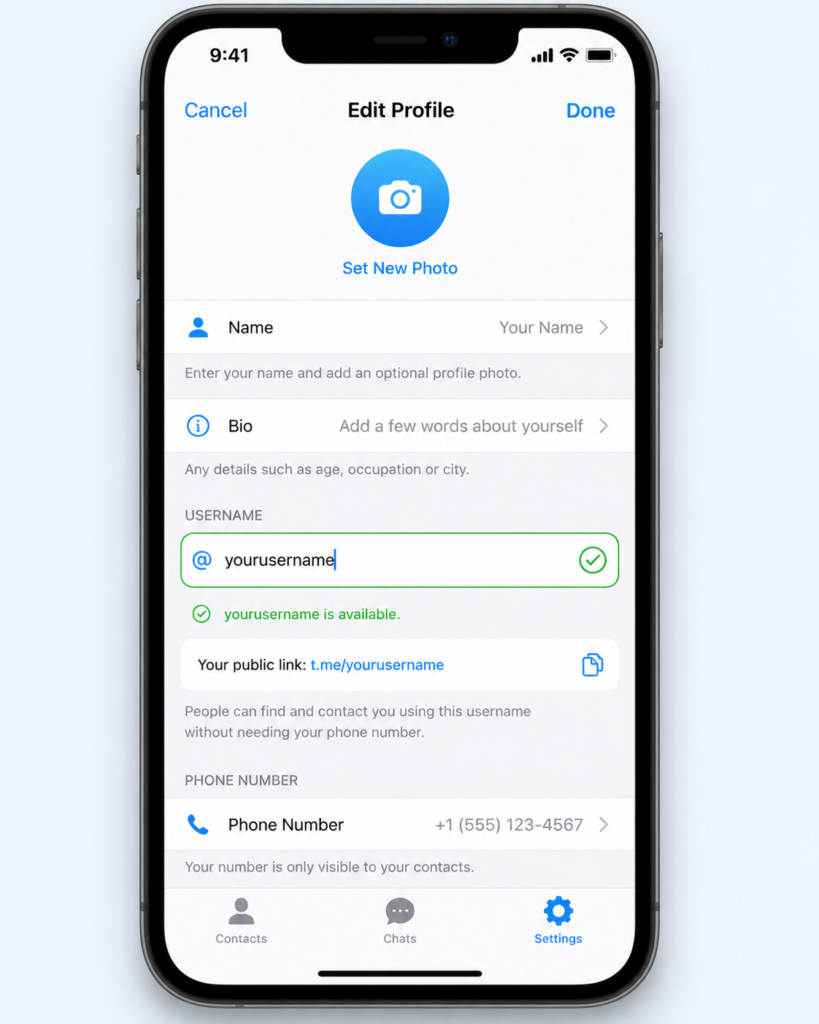
- Open Settings and tap your profile at the top.
- Tap Username.
- Choose a unique handle (Telegram will tell you if it’s taken).
- Save your changes.
Once set, share your t.me/yourusername link instead of your number. Anyone with that link can message you without ever seeing or needing your phone number.
Try It Yourself: Hide Your Number Step by Step
Hide your number in 4 taps
Walk through the exact toggles before you open Telegram. Tap through each step to see where you’re headed.
Hiding Your Number vs. Going Fully Anonymous
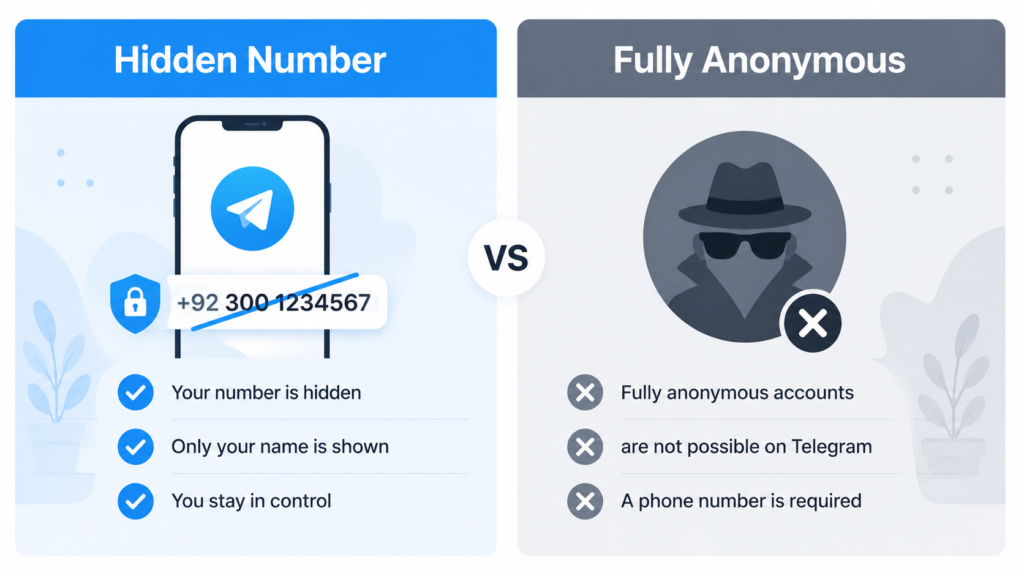
These get confused constantly, so it’s worth separating them clearly.
| Setting | What It Hides | What It Doesn’t Hide |
|---|---|---|
| Phone number visibility → Nobody | Your number from your profile | Your name, username, profile photo, last seen status |
| “Who can find me by my number” → Nobody | Discoverability by number | Discoverability by username, if you have one public |
| Contact sync turned off | Your contact data from Telegram’s servers | Messages you’ve already sent or groups you’re in |
| Last Seen & Online → Nobody | Your activity status | Your number, name, or username |
If your goal is broader anonymity — not just hiding your number — you’ll also want to check Last Seen & Online, Profile Photo, and Forwarded Messages visibility under the same Privacy and Security menu, since each of those is a separate leak point on its own.
Common Mistakes That Undo Your Privacy Settings
| Mistake | What Happens | Fix |
|---|---|---|
| Hiding the number but leaving “Who can find me” open | Strangers with your number can still locate your account | Set both settings, not just one |
| Leaving contact sync on | Telegram keeps re-matching you with new contacts who add your number | Turn off sync and delete existing synced data |
| Using your real name as your display name | Defeats the purpose of hiding your number if your identity is still obvious | Use a username or display name that isn’t identifying |
| Assuming group members can’t see your number | In groups, your number stays hidden as long as your privacy settings are correctly set — but double-check after joining new groups | Recheck settings periodically, especially after major Telegram updates |
| Forgetting settings can reset after major app updates | Occasionally, privacy settings need reconfirming after updates | Recheck your Privacy and Security menu after each app update |
Does Hiding My Number Affect Group Chats or Channels?
No — your number stays hidden in groups and channels the same way it’s hidden everywhere else, based on the visibility setting you chose. Other group members see your display name, username (if set), and profile photo, but not your number, unless you’ve specifically set visibility to allow contacts or everyone to see it.
One exception worth knowing: if you’re in a group with someone who already has your number saved as a contact, Telegram’s contact-matching can sometimes make your profile easier to identify through your name, even if the number itself stays hidden.
Frequently Asked Questions
Can I fully hide my phone number on Telegram?
Yes, by setting both “Who can see my phone number?” and “Who can find me by my number?” to Nobody. This removes it from your profile and blocks discovery by number, though Telegram still uses the number internally for your account.
Can I use Telegram without ever revealing my phone number to anyone?
Yes. Once your number is hidden and you’ve set up a username, you can message and be messaged entirely through your username without anyone seeing your number, even in group chats.
Can I remain fully anonymous on Telegram?
Not completely — Telegram requires a phone number to create an account. You can hide the number from other users and limit visibility of your activity status and profile photo, but Telegram’s own systems still tie your account to that number.
Can strangers on Telegram see my number if I haven’t changed any settings?
By default, your number may be visible to your contacts, and in some cases discoverable by anyone who has it saved. Changing both privacy settings covered above closes this gap.
Will changing my phone number visibility affect existing contacts?
No. People who already have you saved as a contact will still see you in their contact list and can still message you. The setting only controls whether they can see your actual number.
Do I need a username to hide my phone number?
Not strictly, but it’s recommended. Without a username, people who don’t have your number saved may have no way to find or message you at all once your number is hidden.
Does hiding my number stop Telegram from having it?
No. Telegram still requires and stores your phone number to operate your account, including for login and account recovery. Hiding your number only controls what other users can see — it doesn’t remove it from Telegram’s systems.
Next Step
If your goal is protecting your privacy long-term rather than deleting your account, these settings are usually enough on their own. But if you’re weighing whether to leave Telegram entirely instead, our guide on deleting a Telegram account without a phone number covers what to do if you no longer have access to the number tied to your account. And if you’ve noticed unfamiliar activity on your account rather than just a privacy concern, that’s worth treating as a potential hacked account instead of a settings issue.
DeleteAccountGuide.com is not affiliated with Telegram. This guide is for informational purposes only. Steps may vary slightly depending on your app version.

Azam Malik is the founder and author of DeleteAccountGuide.com, where he creates easy-to-follow guides for deleting online accounts safely and protecting digital privacy. With experience in SEO, content strategy, and user-focused website development, he specializes in creating simple step-by-step tutorials that help users manage and remove their online accounts without confusion.


